XYZ file format: what it stores, how to open it and how to convert it
The simplest structure file, and everything a program has to guess when it reads one

Matic Broz, PhD15 min
What is an XYZ file?
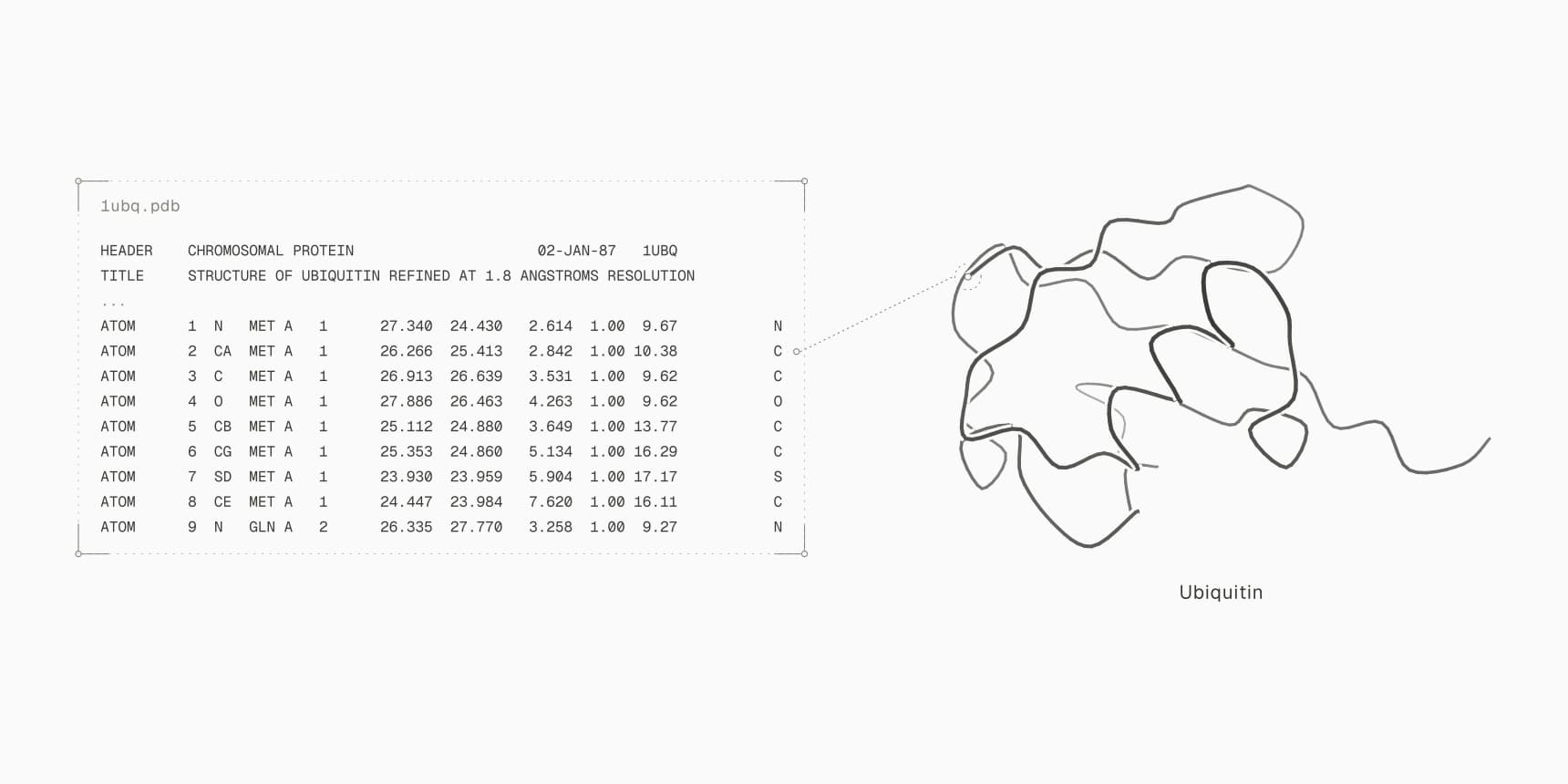
An XYZ file (.xyz) is a plain-text list of atoms and their positions. The first line gives the number of atoms, the second is a free comment, and each line after that holds an element symbol and x, y and z coordinates in ångström.[1] There is no formal specification, so programs read it loosely, but the layout above is what every one of them expects. It is the usual input and output of quantum chemistry programs, semi-empirical methods and machine-learned potentials, because their calculations need nothing more than atoms and positions, plus a charge and multiplicity given separately.
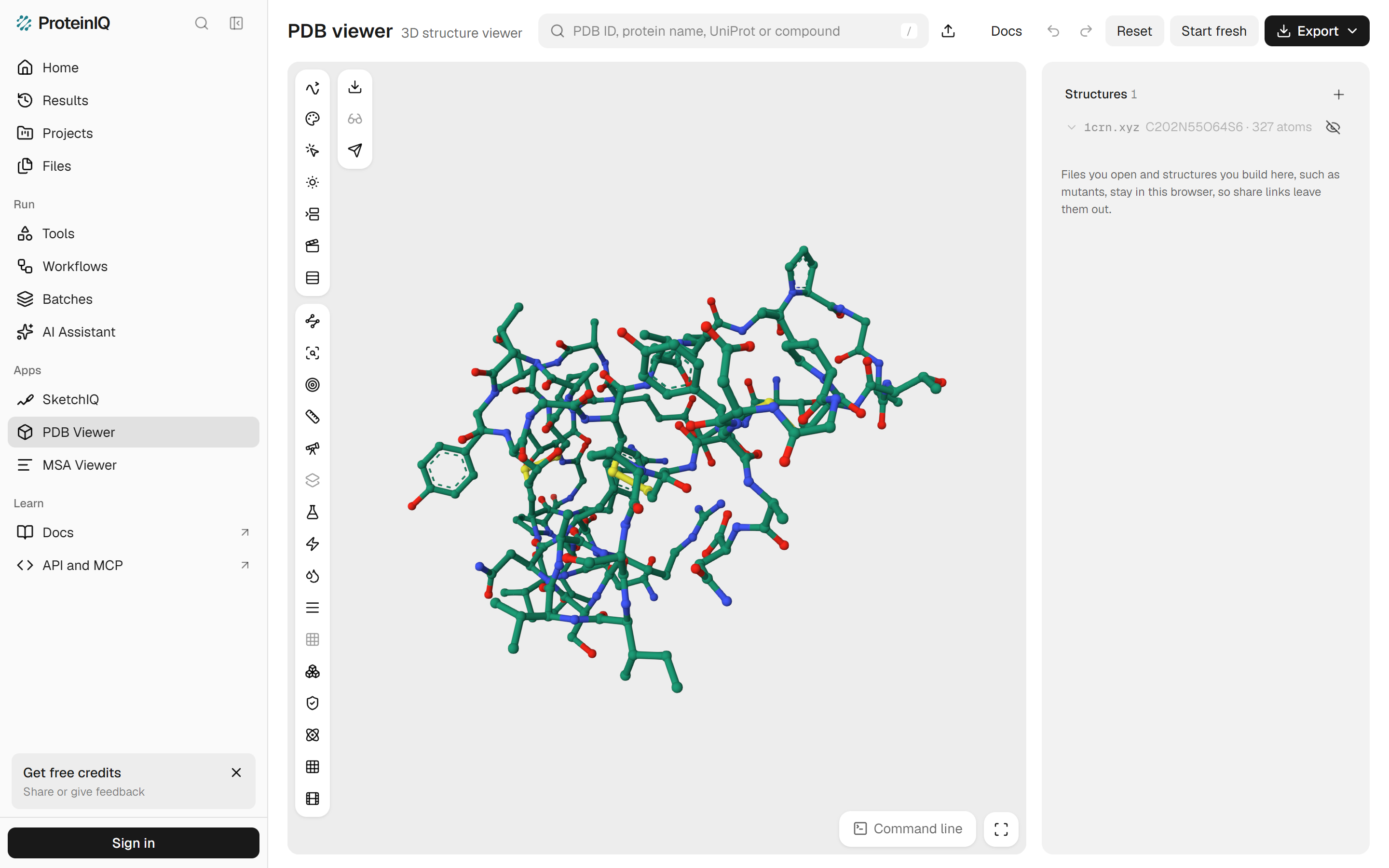
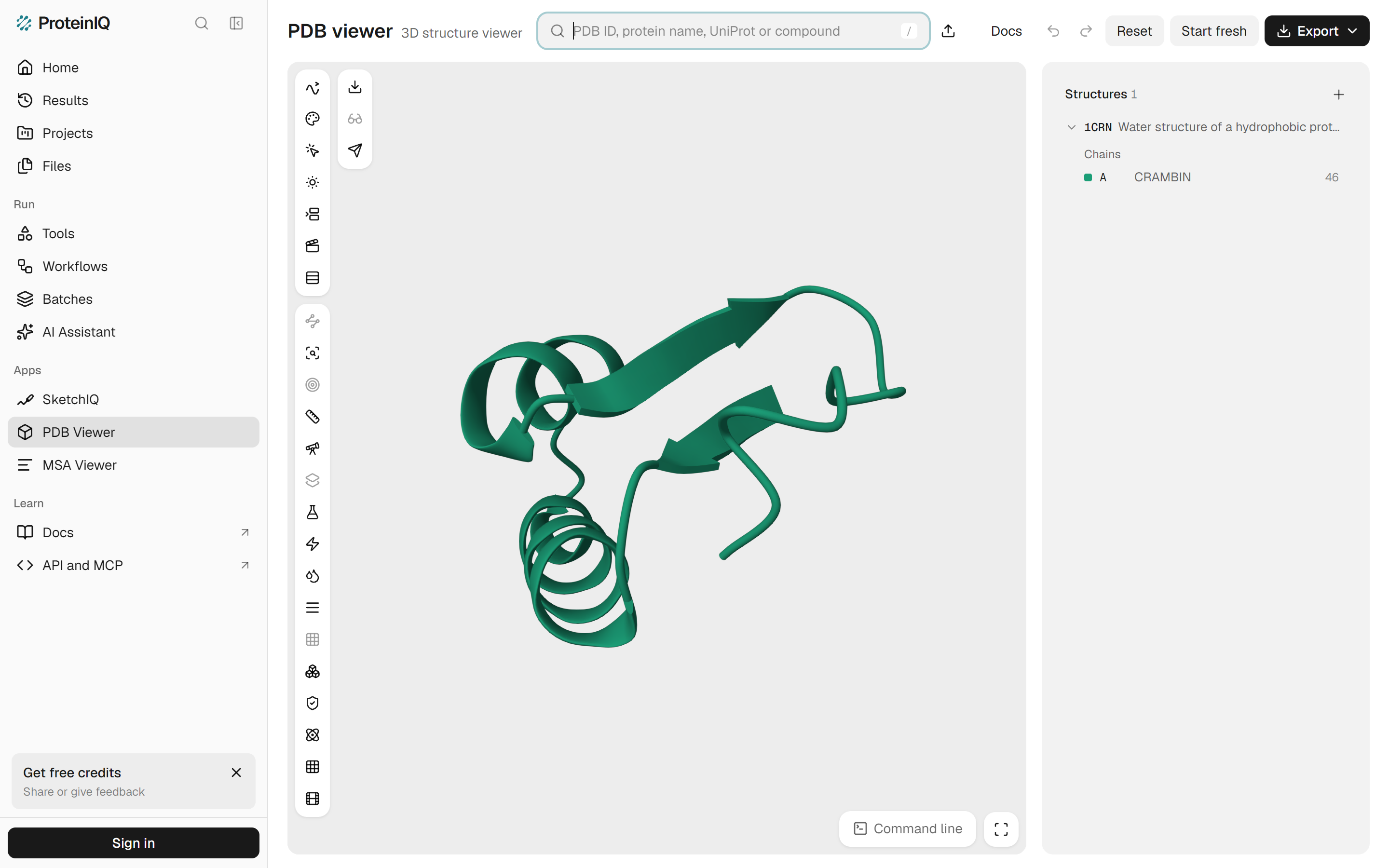
The catch is what the file leaves out: bonds, bond orders, formal charge, residues, chains and everything else that makes a list of atoms into a molecule. The PDB viewer by ProteinIQ shows what that costs. Crambin from PDB entry 1CRN opens as one chain of 46 residues; the same 327 atoms written as XYZ open as C202N55O64S6 · 327 atoms, with no chain, no residue and no cartoon. Acetate goes in as an anion and comes back out of the same viewer, saved as SDF, as neutral acetic acid.
So reading an XYZ file always means rebuilding the rest. A program decides which atoms are bonded from their distances, then infers bond orders from valence rules, and that second step needs a total charge the file never states. How well a conversion goes depends on which of those guesses it makes and whether you give it the missing facts.
 PDB ViewerDrop an .xyz file onto the canvas to see its atoms, bonds inferred from distances, and every frame of a multi-structure file.Open tool
Anatomy of an XYZ file
Here is caffeine, PubChem CID 2519, written as XYZ from PubChem's 3D record by RDKit.[13] The comment line holds the CID, because that was the molecule's name in the source file:
24
2519
O      0.470000    2.568800    0.000600
O     -3.127100   -0.443600   -0.000300
N     -0.968600   -1.312500    0.000000
N      2.218200    0.141200   -0.000300
N     -1.347700    1.079700   -0.000100
N      1.411900   -1.937200    0.000200
C      0.857900    0.259200   -0.000800
C      0.389700   -1.026400   -0.000400
C      0.030700    1.422000   -0.000600
C     -1.906100   -0.249500   -0.000400
C      2.503200   -1.199800    0.000300
C     -1.427600   -2.696000    0.000800
C      3.192600    1.206100    0.000300
C     -2.296900    2.188100    0.000700
H      3.516300   -1.578700    0.000800
H     -1.045100   -3.197300   -0.893700
H     -2.518600   -2.759600    0.001100
H     -1.044700   -3.196300    0.895700
H      4.199200    0.780100    0.000200
H      3.046800    1.809200   -0.899200
H      3.046600    1.808300    0.900400
H     -1.808700    3.165100   -0.000300
H     -2.932200    2.102700    0.888100
H     -2.934600    2.102100   -0.884900
Line 1 is the atom count, 24. Line 2 is free text: a title, a file name, an energy or nothing at all, but it cannot be skipped, so an empty comment is still an empty line. Each of the next 24 lines is an element followed by three coordinates separated by whitespace.[1]
Because the columns are separated by whitespace rather than fixed widths, the number of decimals is up to the writer. RDKit wrote six; Open Babel writes coordinates in a 10.5 format, five decimals.[1] Some programs put an atomic number in place of the element symbol, and Open Babel accepts that: its reader falls back to reading the first column as a number when it is not a symbol.[1][2] Coordinates are Cartesian and in ångström; there is no field for units, so a file written in bohr by mistake looks the same and simply describes a molecule 1.89 times too large.
Compare the caffeine record with the SDF file it came from. The SDF has the same 24 coordinates plus 25 bond lines and 33 data fields. The XYZ kept the coordinates and the order of the atoms. That order matters later: it is the only thing that ties an atom in an XYZ file to the same atom anywhere else.
Extended XYZ adds a cell and properties
Simulations of crystals, surfaces and liquids need a unit cell, and machine-learned potentials need energies and forces stored next to each structure. Extended XYZ, specified by the libAtoms project, fits both into the comment line without changing the rest of the layout.[3] Line 2 becomes a set of key=value pairs:
24
Lattice="20.0 0.0 0.0 0.0 20.0 0.0 0.0 0.0 20.0" Properties=species:S:1:pos:R:3 pbc="T T T"
O      0.470000    2.568800    0.000600
...
Lattice holds the three cell vectors as a 3 × 3 matrix and pbc says along which of them the system is periodic. Properties describes the atom columns as triplets of name, type and count: species:S:1 is one string column for the element and pos:R:3 three real columns for the position.[3] A file with forces adds forces:R:3, and any other key, such as an energy, can be added to line 2.
A reader that knows nothing about extended XYZ sees an ordinary comment and still gets the atoms right, which is the point of the design. The PDB viewer by ProteinIQ opened our test file with the comment line above and drew all 24 atoms; nothing in the viewer shows the cell, so treat it as a viewer for the coordinates only. The machine-learned potentials AIMNet2 and ORB v3 on ProteinIQ read plain and extended XYZ. ORB v3 writes its optimized structures and trajectories as .extxyz, and AIMNet2 writes its optimization trajectory the same way.
Multi-frame XYZ files
An XYZ file can hold several structures one after another, each with its own count and comment line.[1] Computational chemistry programs use this for anything that produces a series of geometries. The semi-empirical program xtb writes its optimized structure to xtbopt.xyz and the whole optimization path to xtbopt.log, a multi-frame XYZ.[7] ORCA writes the final geometry of an optimization to basename.xyz and the path to basename_trj.xyz.[9] The conformer search program CREST writes its final ensemble to crest_conformers.xyz, one conformer per frame.[10]
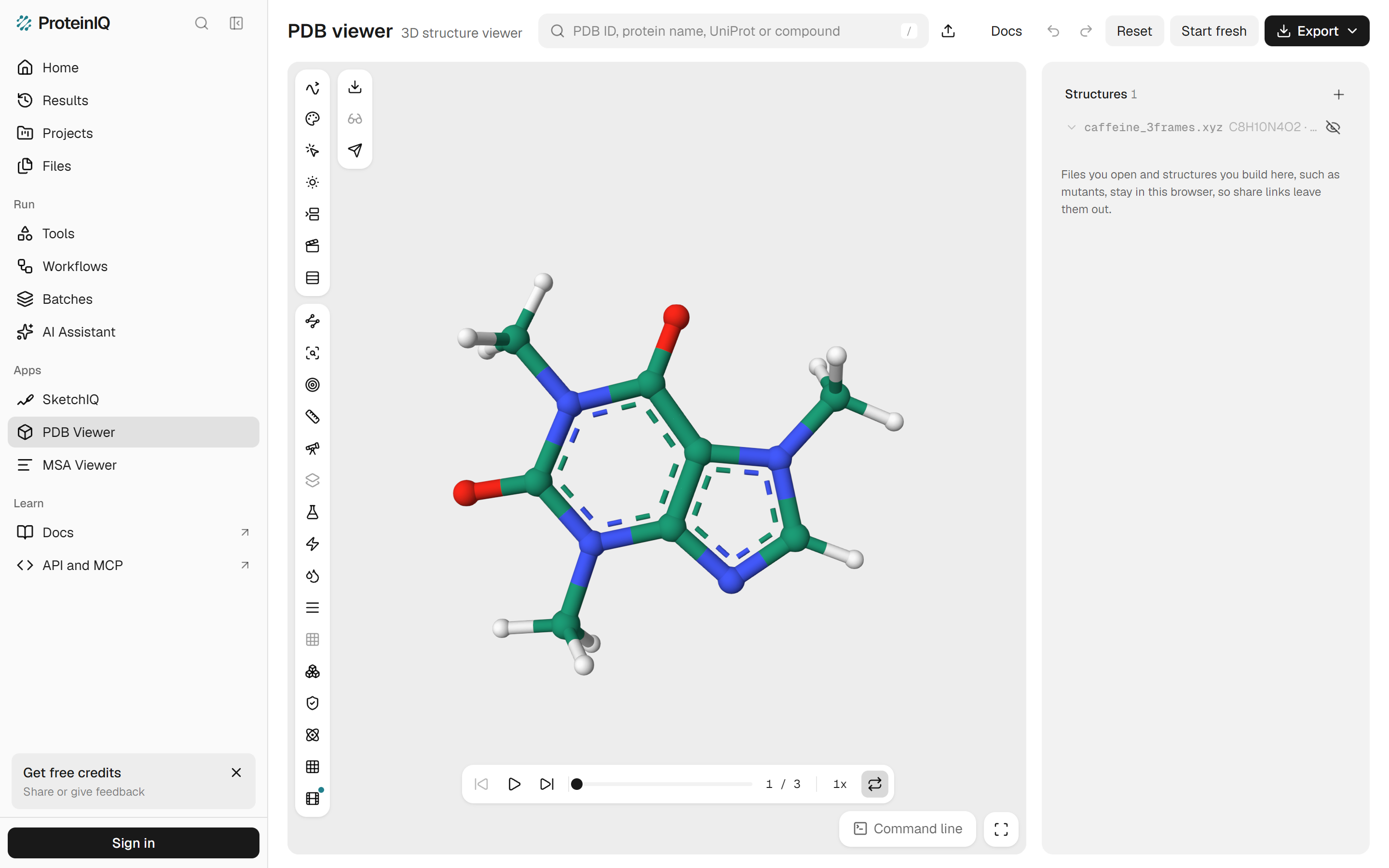
The PDB viewer by ProteinIQ opens such a file as a trajectory. We wrote caffeine three times, shifting it 0.5 Å along x in each frame, and the viewer loaded one structure with a player under the canvas reading 1 / 3 (Figure 4). The player has play, step and loop controls, so an optimization log or a conformer ensemble can be watched from first frame to last.
What an XYZ file leaves out
Everything the richer structure formats say about chemistry beyond the element and position is gone:
- Bonds and bond orders. There is no connection table, so a single and a double bond look the same, and so does a bond and two atoms that happen to sit close together.
- Charge and spin. The file does not say whether the molecule is neutral, an anion or a radical.
- Biological identity. There are no residue names or numbers, chains, alternate locations, occupancies or B-factors, so a protein is just a list of atoms.
Programs that read XYZ fill the first gap themselves. Open Babel connects atoms whose distance fits their covalent radii, then perceives bond orders, unless told not to: the read option -as keeps every bond single and -ab turns bonding off.[1][2] RDKit splits the same job into DetermineConnectivity, which assigns bonds from distances, and DetermineBondOrders, a port of Jan Jensen's group's xyz2mol.[4][5] The method behind it comes from Kim and Kim, who chose bond orders from valence rules alone, without fitted parameters, and reported near-complete success in rebuilding 10,000 PubChem molecules.[6]
The second gap is filled by asking. RDKit's bond-order step needs the molecule's total charge, which defaults to 0.[4][5] Quantum chemistry programs take charge and multiplicity on a separate line: ORCA reads coordinates with * xyzfile 0 1 caffeine.xyz, where 0 is the charge and 1 the multiplicity.[8] AIMNet2 on ProteinIQ has Charge and Multiplicity settings for the same reason. The third gap cannot be filled from the file at all.
One protein and two molecules through XYZ
To see what survives, we took three structures through XYZ and back: crambin from PDB entry 1CRN, a 46-residue protein of 327 atoms with no hydrogens,[12] and the PubChem 3D records of caffeine and acetate. Each was written as XYZ with RDKit 2025.03.5, opened in the PDB viewer by ProteinIQ, exported from the viewer with Export > Structure, and rebuilt with RDKit's rdDetermineBonds for comparison. Table 1 has the results.
| Structure | Viewer canvas | Viewer export | RDKit rebuild |
|---|---|---|---|
| Crambin, 1CRN | 327 atoms in ball and stick, no chain, residues or cartoon | PDB: 327 ATOM lines, every one in residue MOL, chain A, number 1, no CONECT records | 337 bonds, as many as RDKit reads from the PDB file; written as PDB, one residue UNL 1 with no chain |
| Caffeine, CID 2519 | Rings drawn aromatic, both C=O drawn as single bonds | SDF: both C=O double; same InChIKey as PubChem's record | Same SMILES as the source with charge 0 |
| Acetate, CID 175 | Not checked | SDF: neutral acetic acid, CC(=O)O | Fails with charge 0; correct acetate with charge −1 |
Crambin shows the limit no algorithm can cross. The viewer drew bonds from the distances between atoms, disulfide bonds included, and drew the aromatic side-chain rings, but with no residues it could not draw a cartoon (Figure 1). Opened from the database, the same protein is a cartoon with one chain of 46 residues (Figure 2). The exported PDB file keeps the coordinates and loses the rest (Table 1), and programs that need residue names, such as the preparation of a PDBQT file for docking or a validation tool, cannot use it.
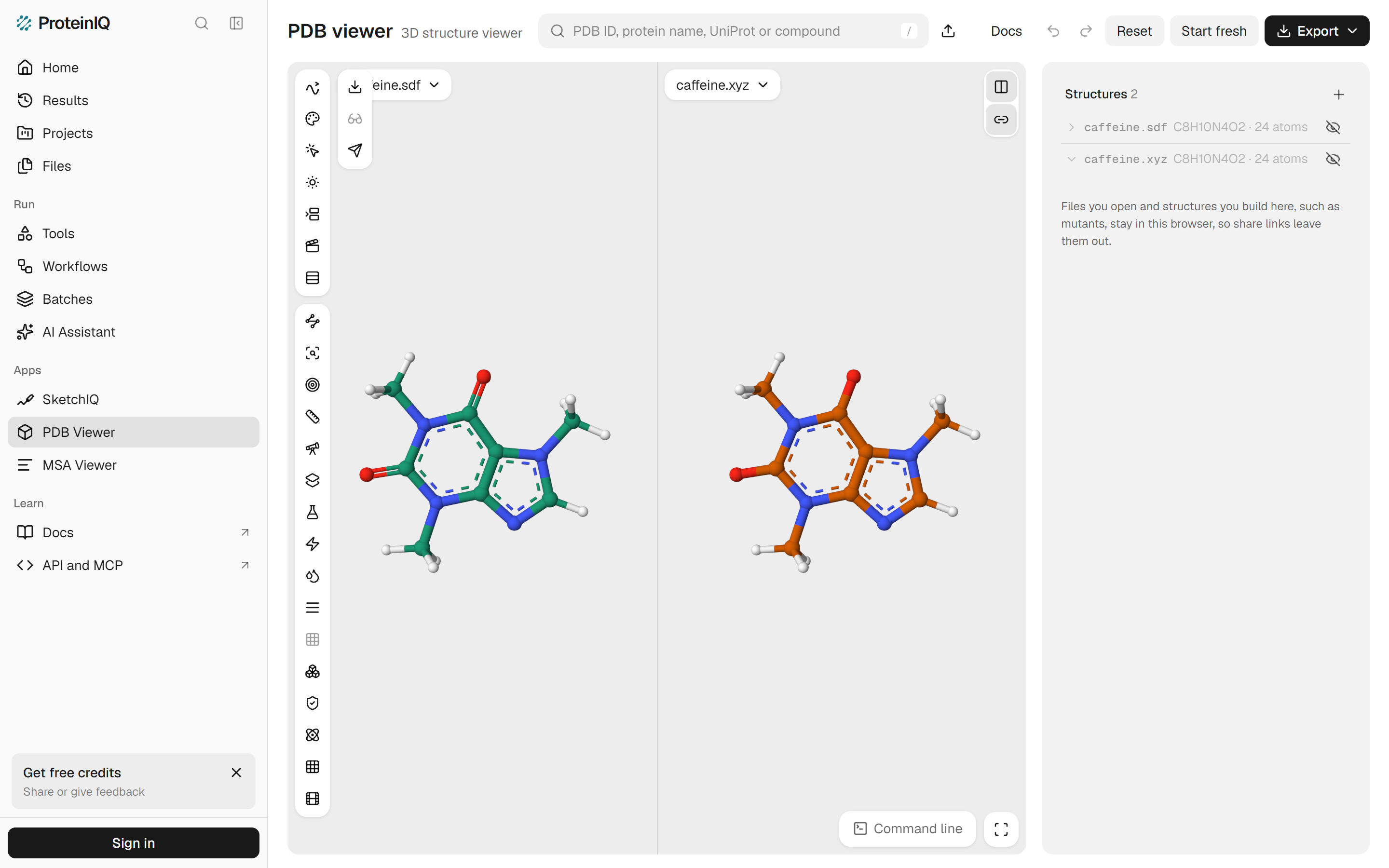
Caffeine shows a display and a file disagreeing. On the canvas, the XYZ copy has both carbonyl groups drawn as single bonds, while the SDF copy beside it shows them double (Figure 3). Yet the SDF the viewer exported from the XYZ copy has every bond order right, with the same InChIKey as PubChem's record, because the exporter perceives bond orders when it writes a molfile. Judge a conversion by the file it writes, not by the sticks on screen. Caffeine opened from PubChem instead of from a file carries its bond orders on the canvas too, and that view can be shared as a link.
Acetate shows the guess that can be wrong without any warning. Assuming a neutral molecule, the viewer exported acetic acid, and any program that reads that SDF adds a hydrogen to the bare oxygen. RDKit refused the same assumption, reporting that it could not find a valid bond ordering, until it was given the charge. Protonation states matter in docking and in quantum chemistry, so for any ion or zwitterion, pass the charge to the converter and check the result.
How to open an XYZ file
Any text editor shows the contents, since the format is plain text. To see the structure, drop the .xyz file, or a gzipped .xyz.gz, onto the PDB viewer by ProteinIQ. It reads the file in your browser without uploading it, lists the formula and atom count, draws bonds from distances and plays multi-frame files as trajectories. Several files can be opened at once, as with the caffeine pair in Figure 3, and the side-by-side button puts them in two panes.
One limit matters when you want to share the view. A file opened from your computer stays in your browser, so Export > Link leaves it out, and a scene made only of your own files cannot be linked. Link the database entry instead, as in the 1CRN link above.
On the desktop, Avogadro reads XYZ through Open Babel.[11] In Python, RDKit reads it with Chem.MolFromXYZFile and Open Babel's obabel reads it from the command line.
How to convert XYZ to PDB, SDF or mmCIF
The PDB viewer by ProteinIQ converts an open XYZ file with Export > Structure, which writes PDB, mmCIF or SDF. Pick the format by what the structure is:
- For a small molecule, write SDF. The exporter assigns bond orders, as it did for caffeine. Then check the charge, because it assumes a neutral molecule, as it did for acetate. A wrong protonation state can be fixed with Open Babel, which adds hydrogens for a chosen pH.
- For a protein or nucleic acid, the file you get from XYZ to PDB is one residue called
MOLwith no bonds written. If the XYZ came from a PDB entry, go back to that entry: PDB download fetches it by ID. If it came from a calculation on a PDB structure and the calculation kept the same atoms in the same order, the atom order is the link: copy the new coordinates into the original PDB file atom by atom. - For mmCIF, the same applies as for PDB, since the residue information is not there to write.
In Python, RDKit does the small-molecule conversion with an explicit charge:
from rdkit import Chem
from rdkit.Chem import rdDetermineBonds

mol = Chem.MolFromXYZFile("acetate.xyz")
rdDetermineBonds.DetermineBonds(mol, charge=-1)
Chem.MolToMolFile(mol, "acetate.sdf")
DetermineBonds runs connectivity and bond orders in one call.[4] On the command line, obabel caffeine.xyz -O caffeine.sdf does the same with Open Babel's bond perception, which is given no charge, so check ions by hand.[2]
How to convert PDB or SDF to XYZ
This direction is easy, because it only throws information away. Open Babel on ProteinIQ runs in your browser: upload a PDB or SDF file and choose xyz as the output format. Crambin's PDB file came back as a 327-atom XYZ in our test. With RDKit, Chem.MolToXYZBlock(mol) returns the text, and obabel 1crn.pdb -O 1crn.xyz does it on the command line.
Two checks before handing the file to a calculation. First, hydrogens: crystal structures such as 1CRN have none, and quantum chemistry methods and machine-learned potentials need every one of them, so add hydrogens before converting. Second, the charge and multiplicity you will have to supply separately, since the XYZ file will not carry them. Write them down while the SDF or PDB file still shows the formal charges.
XYZ tools on ProteinIQ
A typical path is to fetch or build a structure, convert it to XYZ for a calculation, then look at the results:
- PubChem download and SMILES to SDF: get a 3D small molecule with hydrogens
- Open Babel: convert PDB or SDF to XYZ, adding hydrogens on the way
- AIMNet2: energies, forces, charges and geometry optimization from an XYZ file, with charge and multiplicity as settings
- ORB v3: energies, optimization and short molecular dynamics, written out as extended XYZ
- PDB viewer: open single or multi-frame XYZ files and export them as PDB, mmCIF or SDF
 Open BabelUpload a PDB or SDF file and choose xyz as the output format to get plain Cartesian coordinates.Open tool
Frequently asked questions
What is the difference between an XYZ file and a PDB file?
Both store Cartesian coordinates in ångström, but a PDB file also names every atom, residue and chain and can list bonds in CONECT records. An XYZ file has only the element and position of each atom, so a protein written as XYZ loses its residues and chains.
Can an XYZ file hold more than one molecule?
Yes. Structures follow one another, each with its own atom count and comment line.[1] Programs use this for optimization paths and conformer ensembles, and the PDB viewer by ProteinIQ opens such a file as a trajectory with one frame per structure.
What units are XYZ coordinates in?
Ångström, by convention, and Open Babel reads and writes them in ångström.[1] The file has no units field, so a file written in bohr is not marked as such and describes a structure 1.89 times too large.
Why does my XYZ molecule have the wrong bonds or charge?
Because the file stores neither. Readers bond atoms by distance and then guess bond orders for a neutral molecule unless told otherwise.[4] Give the converter the real charge, as with RDKit's charge argument, and check ions and stretched geometries such as transition states by eye.