How to draw chemical structures online for free
A click-by-click walkthrough, from search box to finished file

Matic Broz, PhD15 min
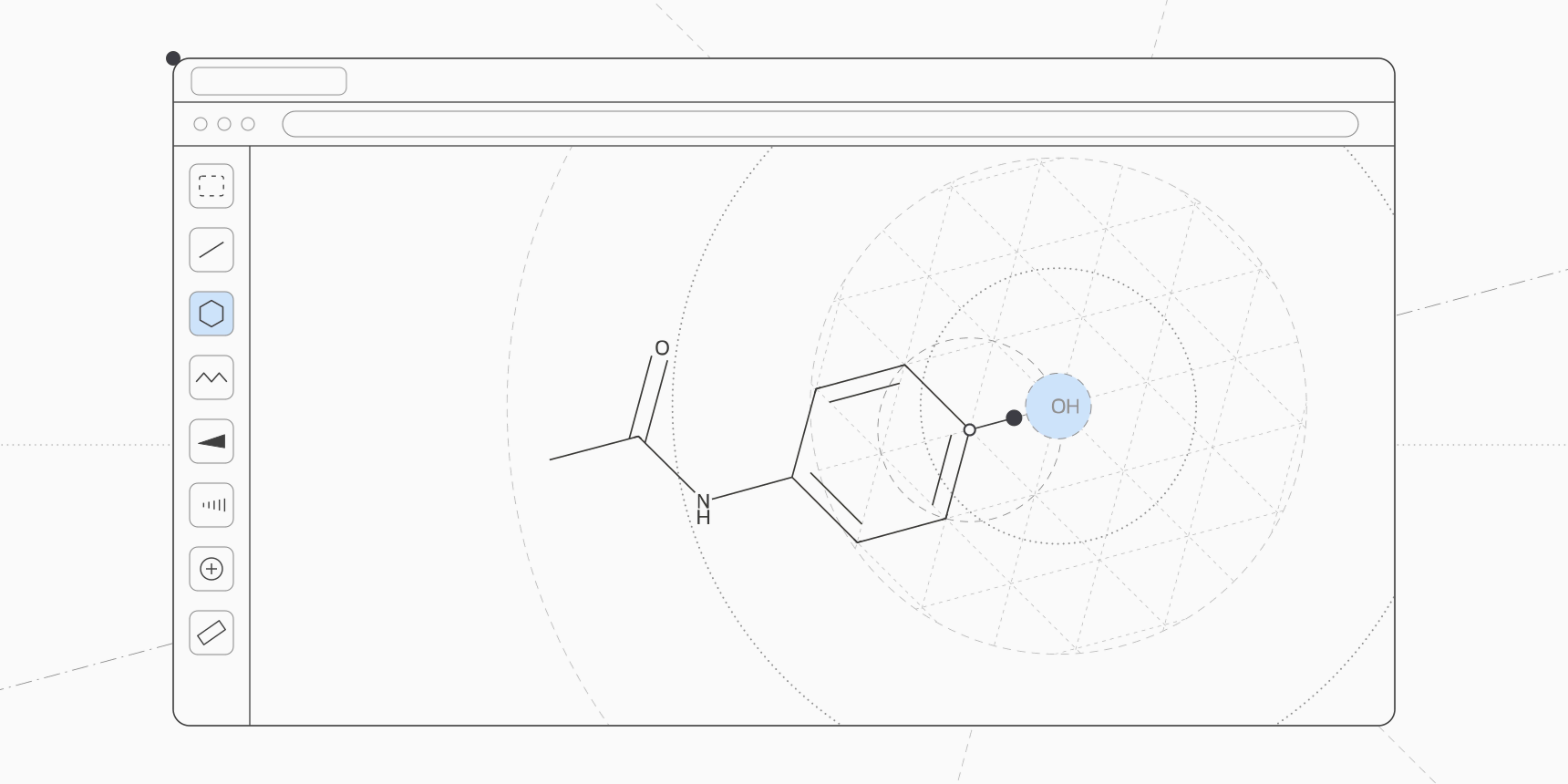
To draw a chemical structure online for free, open SketchIQ, the free chemical structure drawer by ProteinIQ, in any browser. If the compound already exists, type its name, CAS number or SMILES into the search box and press Enter. If it's new, click a ring at the bottom of the canvas, add bonds with the bond tool, and point at an atom and press a letter to change its element.
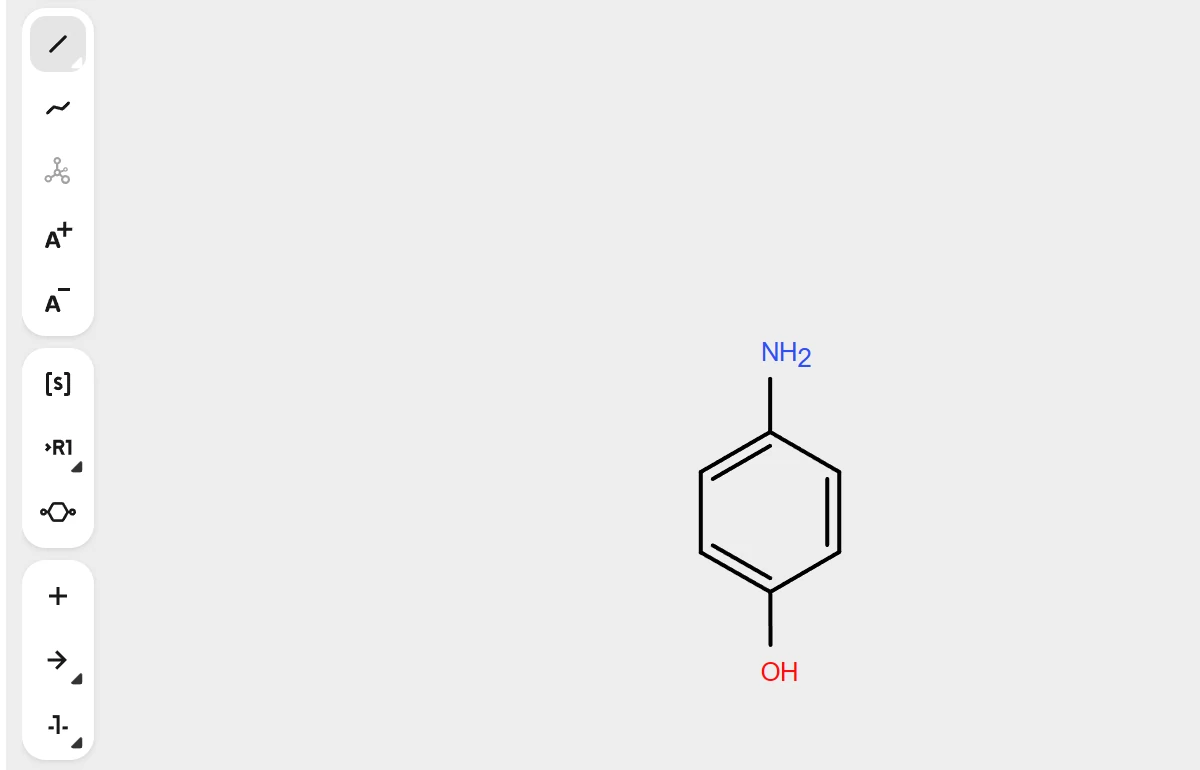
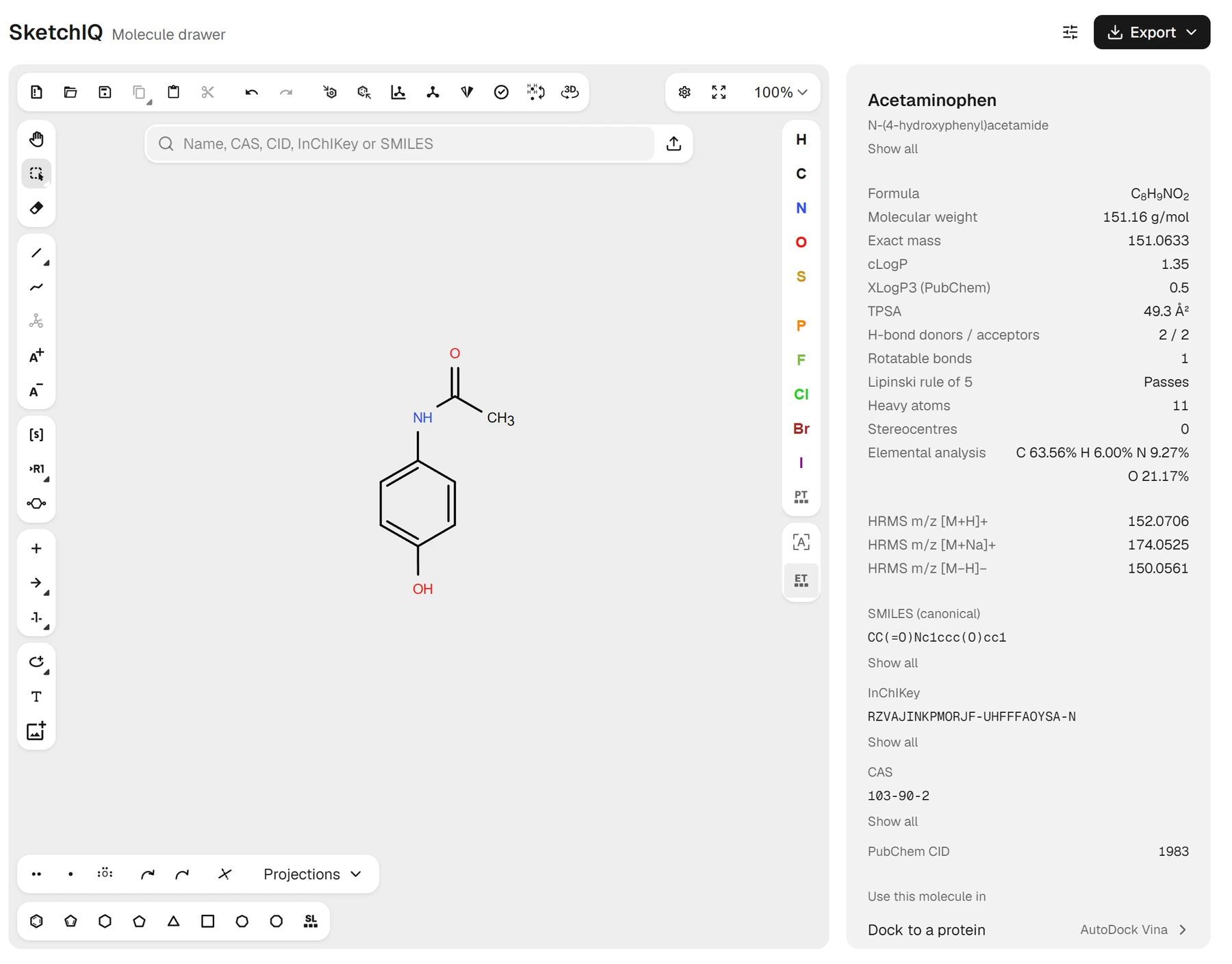
The panel beside the canvas gives the formula, molecular weight and SMILES as you draw, and Export saves the result as SMILES, MOL, ChemDraw CDXML or an image. Drawn by hand, paracetamol takes about a dozen clicks and key presses, and the drawer recognizes it as soon as the last atom is in place:
CC(=O)Nc1ccc(O)cc1That line is the SMILES string SketchIQ reports for the drawing. The canvas is Ketcher, EPAM's open-source structure editor, so its bond, ring, atom and charge tools behave the way chemists expect.[1] Nothing needs installing, and drawing, search and export need no account.
Start from a name, CAS number or SMILES
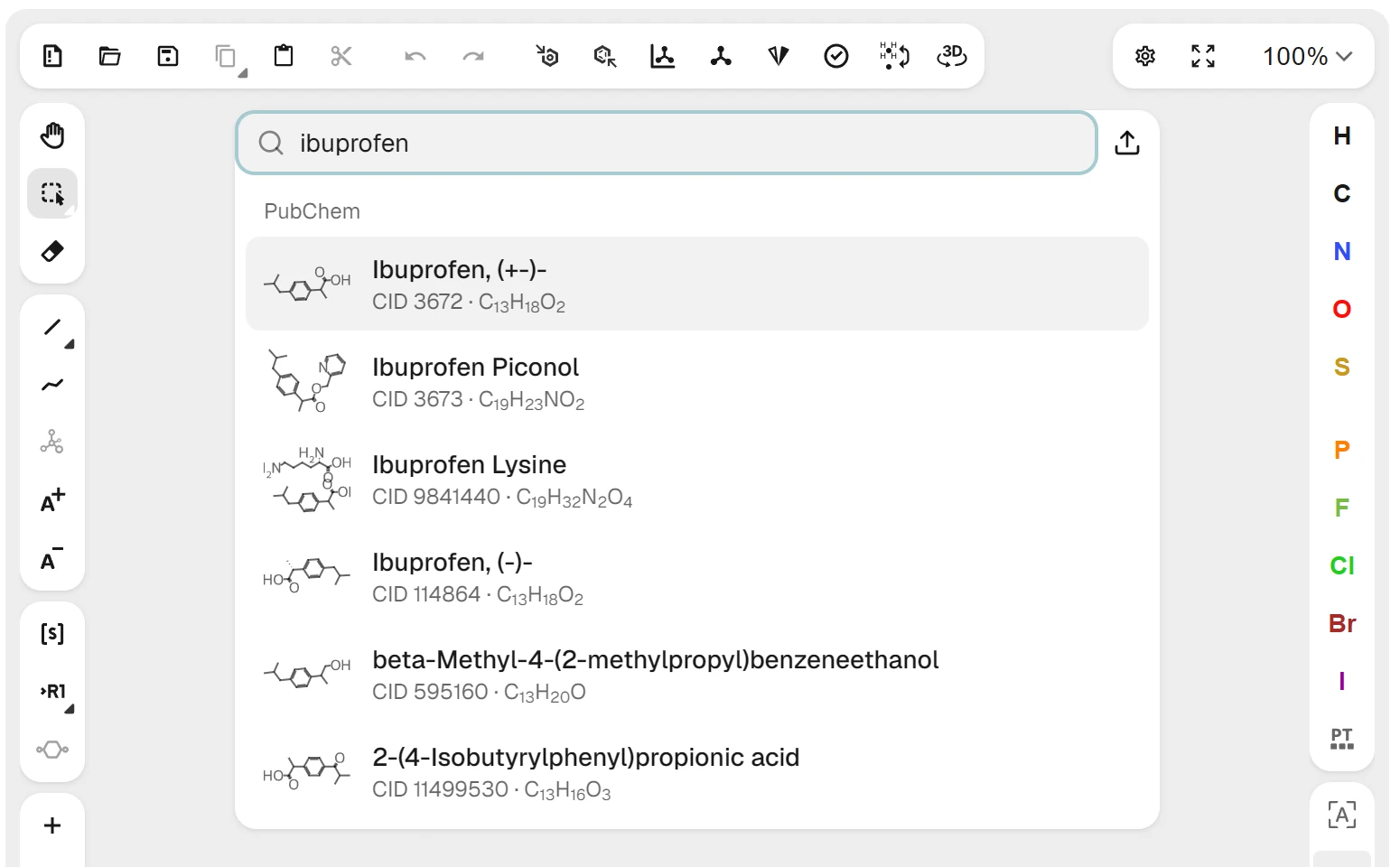
Most structures people need have been drawn before. PubChem holds more than 100 million compounds, and SketchIQ searches it as you type, so for a known drug, reagent or natural product, searching is faster and safer than drawing.[2]
- Open SketchIQ. Press
/anywhere on the page to jump to the search box. - Type a name, such as
ibuprofen. Matches from PubChem appear under the box, each with its CID and formula. - Press
Enterto load the first match, or click another one. The structure replaces whatever was on the canvas. - Check the name at the top of the panel. For ibuprofen it reads Ibuprofen, (+-)-, the racemate, with PubChem CID 3672.
The same box takes other identifiers, which is useful when a paper or a supplier's catalogue gives you a number instead of a name.
| You have | Example | What loads |
|---|---|---|
| Common or trade name | ibuprofen | PubChem's compound of that name, with related names below |
| CAS registry number | 103-90-2 | Paracetamol, listed under PubChem's name, Acetaminophen |
| PubChem CID | 2244 | Aspirin |
| SMILES | CC(=O)Nc1ccc(O)cc1 | Load this structure, with the PubChem match (Acetaminophen, CID 1983) beneath it |
| InChIKey | RZVAJINKPMORJF-UHFFFAOYSA-N | Paracetamol again |
The step people get wrong is pressing Enter with a drawing already on the canvas, which replaces it. Press Shift+Enter instead to put the search result beside what you've drawn, the quick way to set a reagent next to a substrate. If you replace something by mistake, Ctrl+Z (Cmd+Z on a Mac) brings it back. How the identifiers differ, and which to trust for what, is covered in InChI, InChIKey, SMILES and CAS numbers.
You can also open a file instead of searching. The upload button at the right end of the search box reads MOL, SDF, ChemDraw CDX and CDXML, SMILES, InChI and other structure files, which is how you open a CDX file without ChemDraw.
How to draw a structure by hand
New compounds, analogs and exam answers have to be drawn. The walkthrough below builds paracetamol from a benzene ring, and the same moves draw almost anything: place a ring, grow bonds off it, change atoms, fix bond orders.
- Click the Benzene ring in the template bar at the bottom of the canvas, then click the middle of the canvas to place it.
- Press
1to pick the single bond tool. Click the top atom of the ring, then the bottom atom. Each click grows a new bond outward. - Point at the new atom at the bottom and press
o. It becomes an oxygen, drawn as OH. Point at the new atom at the top and pressn. - Drag from the nitrogen up and to the right to draw a bond to a new carbon. From that carbon, drag once straight up and once down and to the right.
- Press
2to pick the double bond tool and click the bond that points up. Then point at its end atom and presso.
The drawer fills in hydrogens on its own, so you never draw them on carbon, and it labels heteroatoms with their hydrogens (OH, NH₂) as you go. As soon as the last oxygen is in, the panel names the structure Acetaminophen, PubChem's name for paracetamol, which is the quickest check that you drew what you meant.
The mistake that's easy to miss is the ring. The Cyclohexane template sits next to Benzene in the bar and looks similar at small size; picked by accident, it gives a formula with six extra hydrogens. Compare the formula in the panel with the one you expect before you export.
Bonds, chains and charges
To change a bond's order, press 1, 2 or 3 for the single, double or triple bond tool and click the bond. Pressing 1 again and again cycles the single bond tool through a wedge, a hash and a wavy bond, the bonds used for stereochemistry; how to choose between them and read the R and S labels is in how to draw stereochemistry.
The Chain tool in the left toolbar draws a zigzag carbon chain as you drag, which is quicker than clicking out a long alkyl group bond by bond. For a charge, press = (plus) or - (minus) to pick the charge tool and click the atom. The panel's formula shows the charge, so you can check that a carboxylate or an ammonium came out right.
Typing groups instead of drawing them
Protecting and functional groups don't need drawing atom by atom. Point at an end atom, one with a single bond, and press Enter, or hold Shift and press a letter, and a small label box opens. Type OMe, CO2Et, Boc or OTBS and press Enter, and the atom becomes that group, drawn contracted the way it appears in papers. The box suggests matching labels as you type, and Tab completes the highlighted one.
A group replaces one atom, so it needs an atom with one bond to attach by. Typed on a ring atom, the box says so and leaves the drawing alone; grow a bond off the ring first, then label its end.
Keyboard shortcuts for drawing faster
Once the basic moves are familiar, the keyboard does most of the work. These are the ones worth learning first; hovering over any toolbar button shows its shortcut. On a Mac, use Cmd wherever the table says Ctrl.
| Key | What it does |
|---|---|
1, 2, 3 | Single, double or triple bond tool; press 1 again for wedge, hash and wavy bonds |
c, n, o, s, p, f, l, b, i, h | Change the atom you're pointing at to C, N, O, S, P, F, Cl, Br, I or H |
t | Ring templates; press again to step through benzene, cyclopentadiene, cyclohexane and the rest |
Shift+T | Open the structure library |
= and - | Charge plus and charge minus tools |
Del | Eraser, or delete the selection |
Esc or Shift+Tab | Back to the selection tool |
Ctrl+Z and Ctrl+Shift+Z | Undo and redo |
Ctrl+A | Select everything on the canvas |
Ctrl+L | Lay out the structure again |
Ctrl+Shift+L | Clean up bond lengths and angles |
Alt+H and Alt+V | Flip the selection horizontally or vertically |
/ | Jump to the search box |
The letter keys are the ones to learn first. Pointing at an atom and pressing n is far quicker than opening the periodic table, and the same keys pick an atom tool when you aren't pointing at anything.
Templates and the structure library
The template bar under the canvas holds the common rings: benzene, cyclopentadiene, cyclohexane, cyclopentane, and three- to eight-membered carbocycles. Click a ring, then click a bond of your drawing, and the new ring is fused along that bond. Benzene clicked onto a side of benzene gives naphthalene, C₁₀H₈, in two clicks.
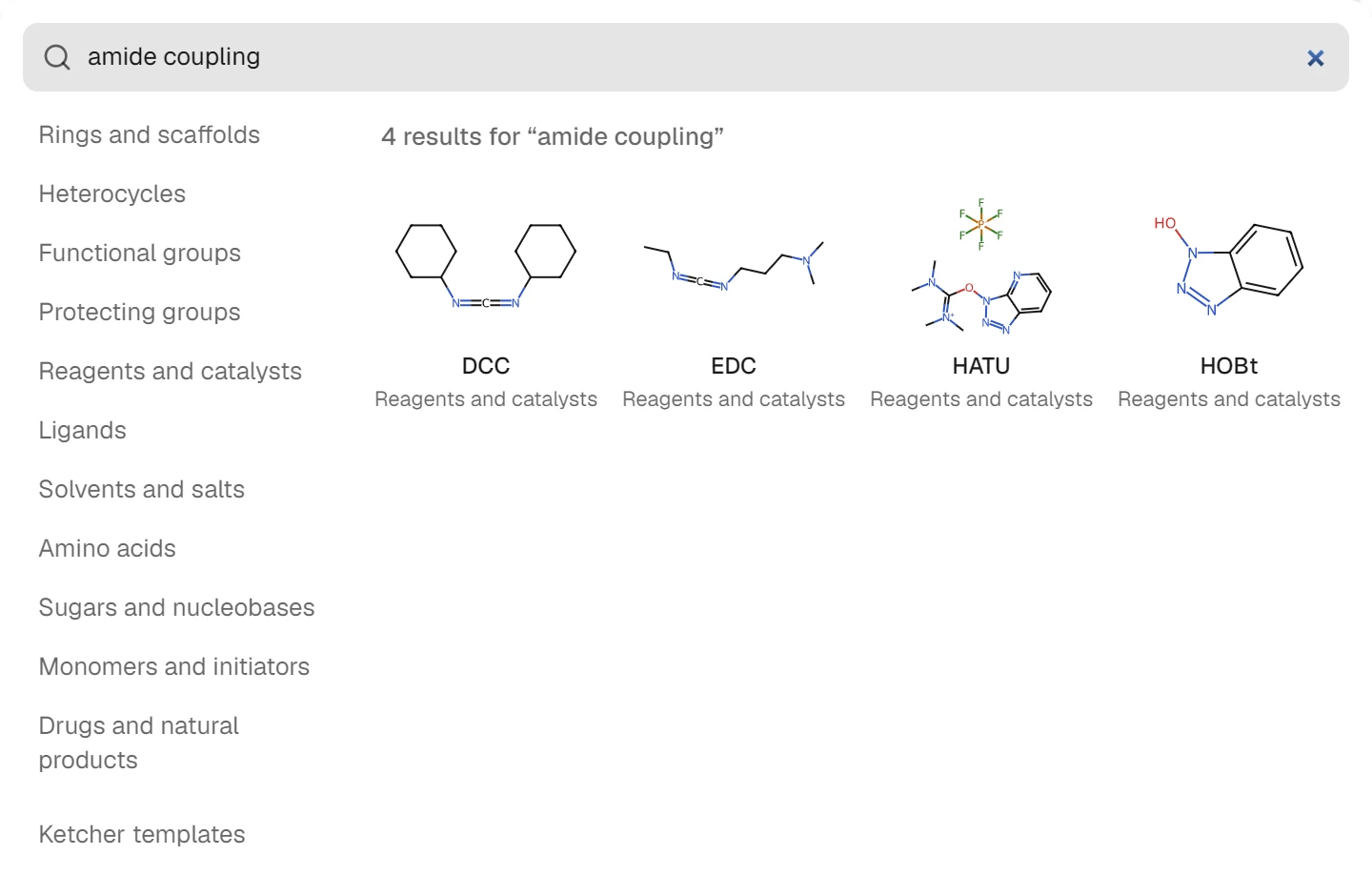
For anything bigger, open the structure library with the button at the end of the template bar or Shift+T. It holds about 350 ready-made structures in groups: rings and scaffolds, heterocycles, functional and protecting groups, reagents and catalysts, ligands, solvents and salts, amino acids, sugars and nucleobases, monomers, and drugs and natural products.
Its search reads uses as well as names, so amide coupling finds DCC, EDC, HATU and HOBt. Pick a structure and click the canvas to place it. Ketcher templates, at the end of the group list, opens the editor's own template library as well.
Editing what you've drawn
Most edits start with the selection tool (Esc). Drag a box around atoms to select them, then drag the selection to move it, or press Del to delete it. Clicking with the eraser removes one atom or bond at a time. Undo goes back step by step, and the drawer saves the drawing in the browser tab, so a reload doesn't lose it.
When a structure built from many clicks ends up lopsided, select it and press Ctrl+Shift+L to clean up bond lengths and angles, or Ctrl+L to lay it out from scratch. Clean-up keeps your arrangement and tidies it; layout redraws the whole thing in a standard orientation, which helps with a structure pasted from a SMILES string.
A reaction is drawn the same way: draw the starting materials, pick the arrow tool in the left toolbar, drag an arrow, and draw the products after it. The panel switches from a single molecule to the reaction, listing reactants and products.
Reading the details panel
The panel to the right of the canvas (Figure 3) describes whatever you've drawn and updates with every edit. Select part of a drawing and it describes only the selection, which is how you check one half of a salt or one molecule in a scheme. For the paracetamol drawn above, it reads:
| Row | Value | What it's for |
|---|---|---|
| Formula | C8H9NO2 | Checking you drew the right atoms |
| Molecular weight | 151.16 g/mol | Weighing out a sample, molarity |
| Exact mass | 151.0633 | High-resolution mass spectrometry |
| HRMS m/z [M+H]+ | 152.0706 | The ion you'd look for in positive ESI |
| cLogP | 1.35 | Lipophilicity, from atom contributions |
| TPSA | 49.3 Ų | Polar surface area, a permeability guide |
| Lipinski rule of 5 | Passes | A first drug-likeness check |
| CAS | 103-90-2 | Ordering or looking it up elsewhere |
cLogP is the Wildman and Crippen atom-contribution estimate and TPSA is Ertl's fragment-based polar surface area, both calculated with RDKit in your browser.[3][4] The name, IUPAC name, CAS number and PubChem CID come from PubChem, looked up by the structure's InChIKey, and appear only for compounds PubChem knows. A new structure shows Unknown name with every calculated value still there.
Two rows deserve a second look. Molecular weight averages over natural isotopes, while exact mass uses the most abundant isotope of each element, and mixing them up is a common error in mass spectrometry reports; molecular weight vs exact mass explains when to use which. The Lipinski rule of five row counts violations of the four limits and passes a compound with at most one.
The panel also checks the structure as you draw. A carbon with five bonds gets a Check the structure note giving the atom's number, the most common sign of a stray click, and the calculated values wait until it's fixed.
Exporting the structure
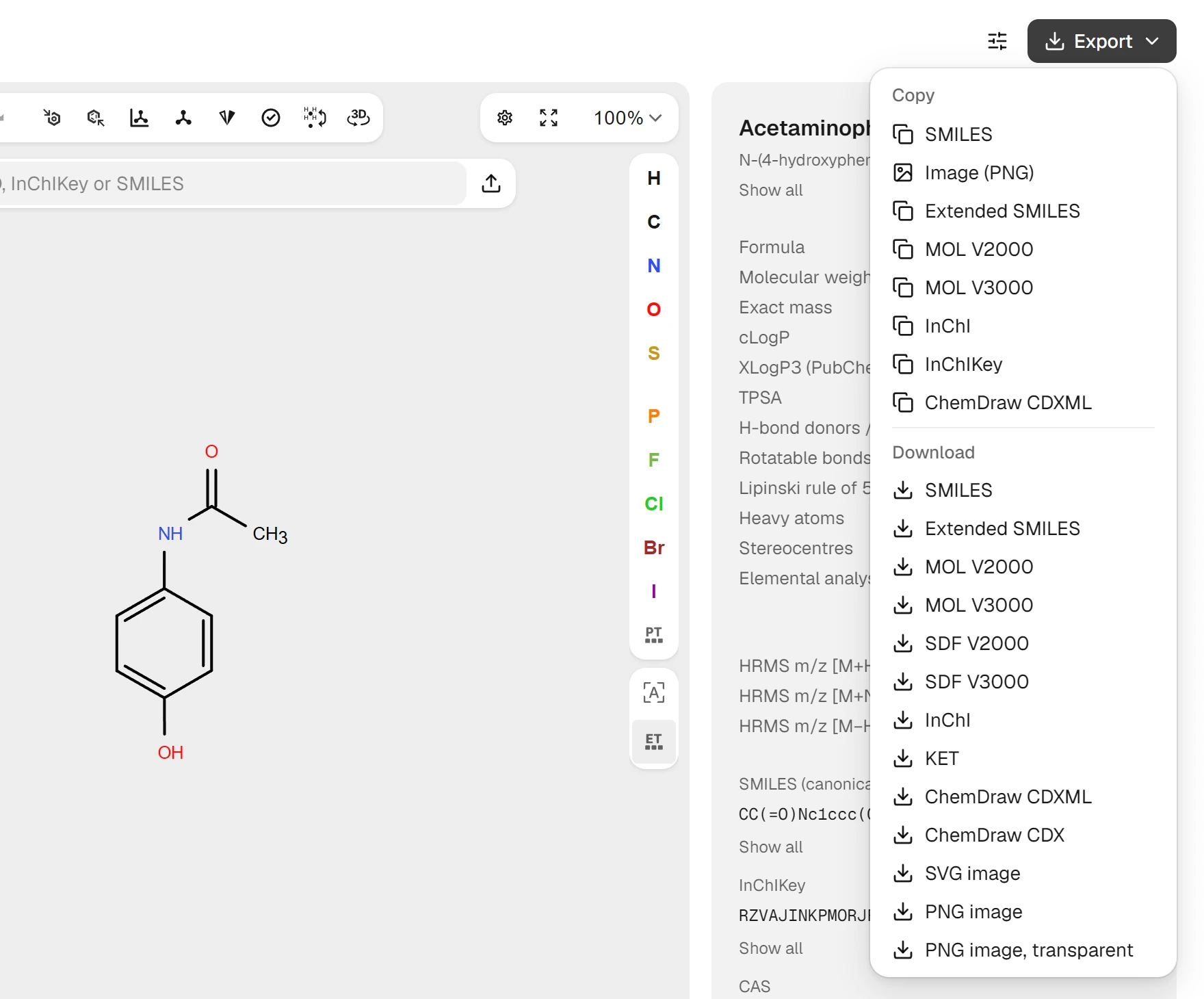
Click the SMILES in the panel and it's on your clipboard; the name, InChIKey and CAS number copy the same way. For anything else, open Export at the top right of the page. Its Copy section puts text or a picture on the clipboard, and Download saves a file.
Which format to pick depends on where the structure goes next:
| Where it goes | Format |
|---|---|
| A database search, a spreadsheet or another tool's input box | SMILES |
| Docking or cheminformatics software | MOL or SDF |
| A colleague who uses ChemDraw | ChemDraw CDXML, or CDX |
| A report, slide or poster | PNG, or SVG for print |
| Reopening in SketchIQ later | KET, which keeps everything on the canvas |
Image (PNG) copies a picture of the drawing, ready to paste into a slide, and the download menu offers PNG on white or on a transparent background. SVG stays sharp at any size; for journal figures, publication-quality chemical structures covers bond widths, fonts and journal styles. What each file format keeps and loses is compared in chemical file formats.
Save before you close the tab. The drawer keeps your work through reloads, but closing the tab discards it, so download a CDXML, MOL or KET file for anything you want to come back to.
Common mistakes when drawing structures online
| Problem | Symptom | Fix |
|---|---|---|
| Cyclohexane instead of benzene | Formula has six more H than expected | Undo and place the Benzene template instead |
| Search result replaced your drawing | Your structure is gone after pressing Enter | Ctrl+Z, then use Shift+Enter to place results beside the drawing |
| Hydrogens drawn by hand on carbon | Cluttered drawing, sometimes a valence warning | Leave carbon hydrogens out; the drawer adds them |
| Stereocentre drawn without a wedge | Stereocentres row reads "1 (1 undefined)" | Press 1 until the wedge or hash tool is active, then click the bond at the stereocentre |
| Letter pressed while pointing at nothing | An atom tool is active and the next click places that atom | Press Esc to go back to selection |
| Tab closed without exporting | Drawing gone the next day | Download CDXML, MOL or KET before closing |
After you have the structure
A drawn molecule is usually a starting point. The Use this molecule in list, below the identifiers in the panel, opens a ProteinIQ tool with the structure already loaded: AutoDock Vina to dock it into a protein, Boltz-2 to co-fold it with one, ADMET-AI and eToxPred for absorption and toxicity predictions, and molecular descriptors for a longer property table.
From a drawn molecule to a docking result walks through the first of those end to end, and the panel's predicted pKa section is covered in how to predict pKa online.
If you need a 3D file rather than a drawing, the SMILES goes straight into SMILES to SDF or SMILES to PDBQT, which generate coordinates for docking.
FAQ
Is there a free online version of ChemDraw?
ChemDraw's own web app comes only with the Signals ChemDraw subscription; what it costs is in ChemDraw price and licences. Free online editors such as SketchIQ, Ketcher and PubChem Sketcher cover drawing, search and export, and SketchIQ opens and saves ChemDraw CDX and CDXML files. The best free ChemDraw alternatives compares them.
Do I need an account to draw structures?
No. Drawing, search, the details panel and every export work without signing in. A free ProteinIQ account comes in when you run a tool, such as docking, from Use this molecule in.
Does it work on a Mac, a Chromebook or a tablet?
It runs in any modern browser, so Mac, Windows, Linux and ChromeOS all work, and Cmd replaces Ctrl in shortcuts on a Mac. The keyboard shortcuts make a mouse and keyboard much faster than a touchscreen. The desktop options for Mac users are covered in ChemDraw on Mac, Linux and Chromebook.
How do I get the SMILES of a structure I drew?
Click the SMILES line in the details panel, or open Export and choose SMILES under Copy. The string is RDKit's canonical SMILES, so the same molecule drawn two different ways gives the same string.
Is my structure sent anywhere?
Drawing, properties and export all run in your browser. Text you type into search has to leave the page to be looked up, and each drawn structure's InChIKey goes to PubChem to fetch its name, CAS number and CID. The sliders button beside Export has a switch, Look up structures on PubChem, that turns the second lookup off, after which the structures you draw stay in your browser.