How to open a CDX or CDXML file without ChemDraw
Free ways to view, edit and convert a ChemDraw file someone sent you

Matic Broz, PhD11 min
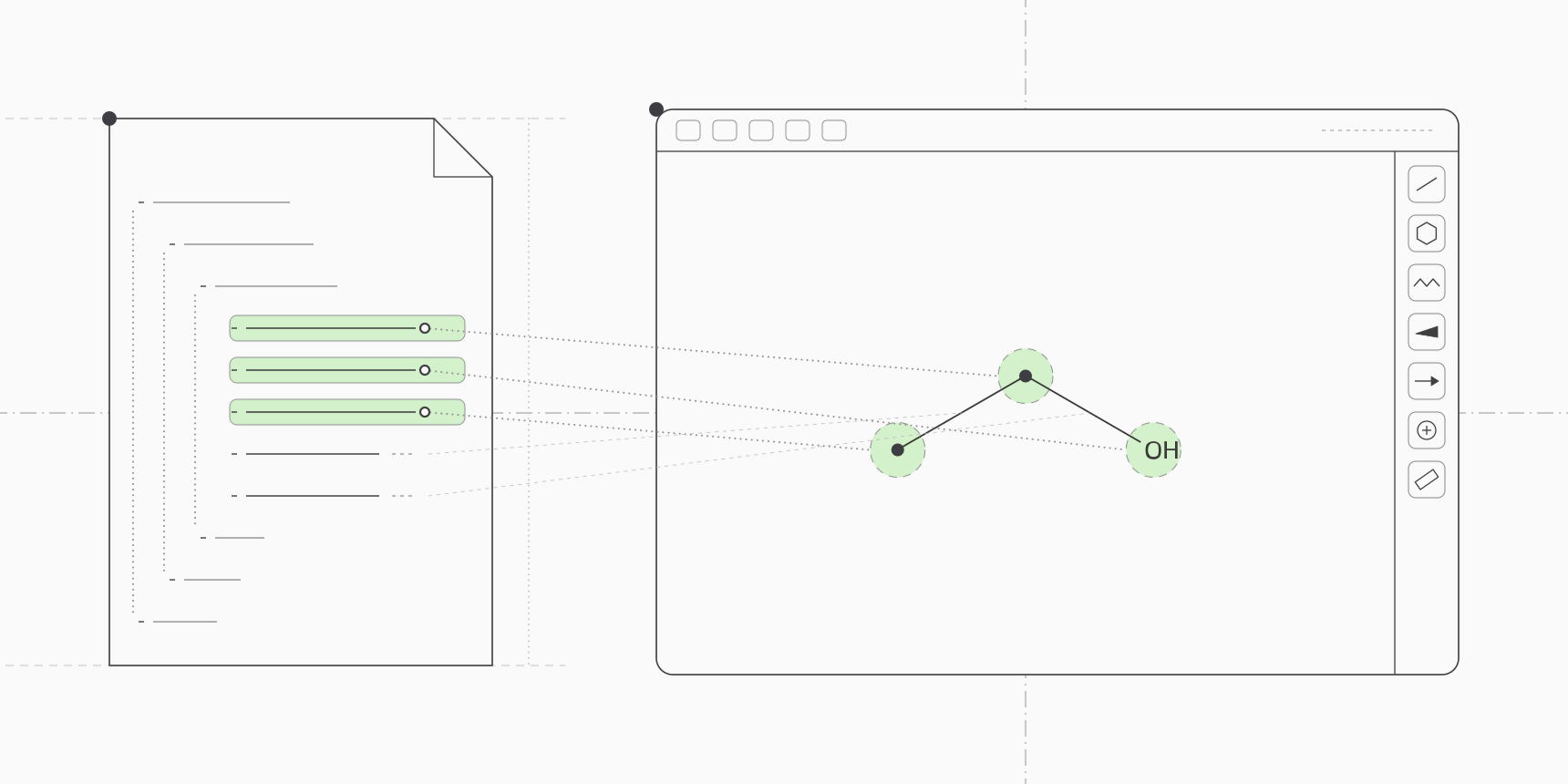
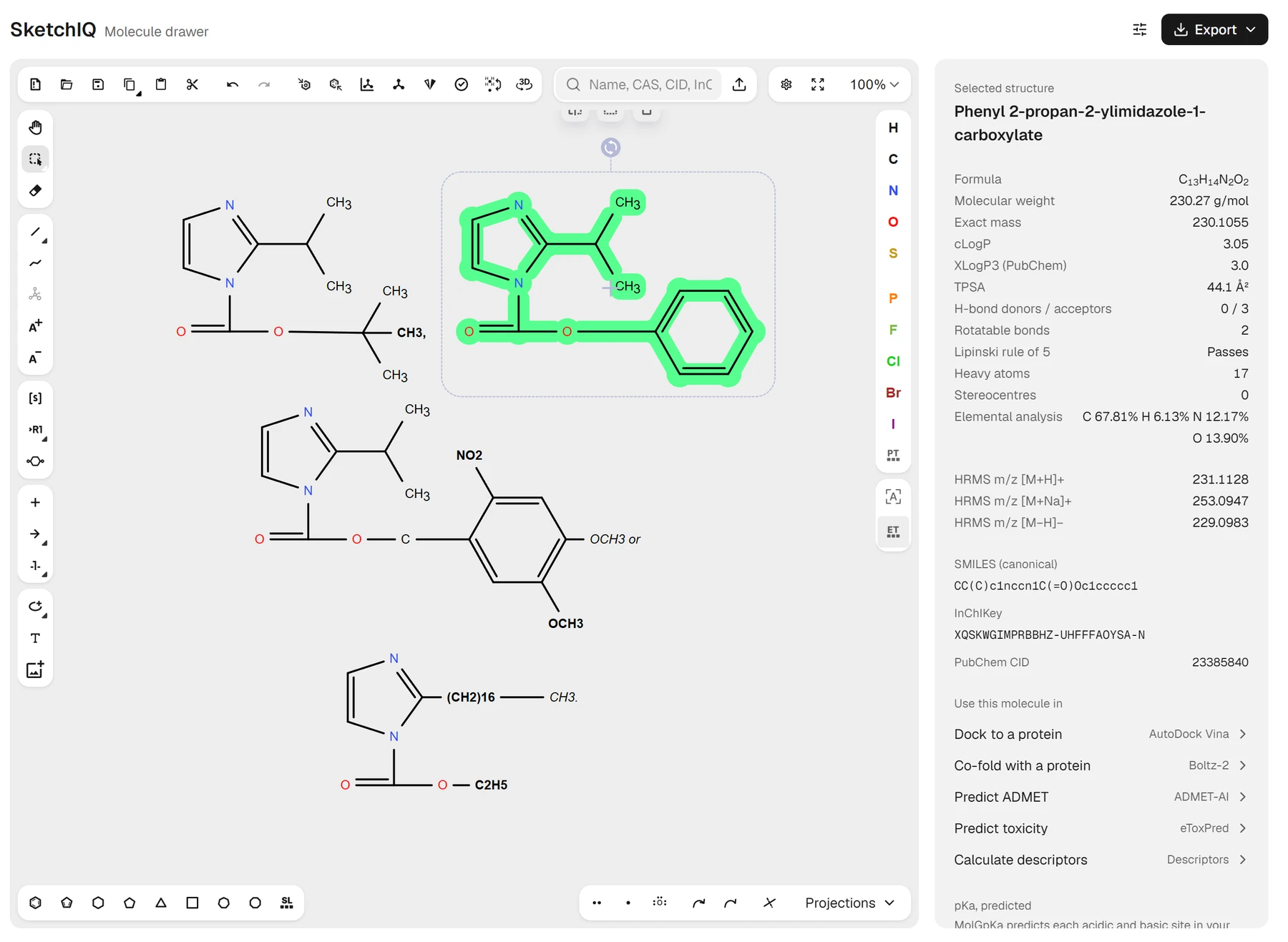
To open a .cdx or .cdxml file without ChemDraw, upload it to SketchIQ, the free chemical structure drawer by ProteinIQ. It runs in your browser with no account, draws the structures from the file on its canvas, and lets you edit them, copy the SMILES, or save them as MOL, SDF, PNG or a fresh ChemDraw file. Both versions of the format open the same way.
The two look nothing alike on the inside. A CDX file is binary, and every one we opened started with the same eight characters; a CDXML file is plain XML that any text editor will show you:
CDX (binary), first bytes of ethanol.cdx:
56 6a 43 44 30 31 30 30  VjCD0100

CDXML (text), first lines of a file saved by ChemDraw 23.1:
<?xml version="1.0" encoding="UTF-8" ?>
<!DOCTYPE CDXML SYSTEM "https://static.chemistry.revvitycloud.com/cdxml/CDXML.dtd" >
<CDXML
 CreationProgram="ChemDraw 23.1.2.7"
CambridgeSoft created CDX as ChemDraw's native format, and CDXML encodes the same objects as XML, so ChemDraw converts between them with no loss of information. The US Patent and Trademark Office adopted CDX for the chemical structures in patent filings.[1] That is why the format turns up long after the person who drew it has moved on.
CDX vs CDXML: which file do you have?
Both formats store a ChemDraw document, not just a molecule: every structure on the page, plus arrows, text, colours, brackets and the page layout.[1] A molfile or SMILES string holds only the chemistry, which is why converting a ChemDraw file is easy for the structures and lossy for everything around them.
| CDX | CDXML | |
|---|---|---|
| Extension | .cdx | .cdxml |
| Encoding | Binary | XML text |
| Opens in a text editor | As unreadable characters, starting with VjCD0100 | Yes, starting with <?xml and <CDXML |
| Typical source | Older ChemDraw files and patent drawings | Newer ChemDraw versions, electronic lab notebooks |
| Free tools that read it | SketchIQ, Ketcher, Open Babel | SketchIQ, Ketcher, RDKit, Open Babel with XML support |
A CDXML file also keeps its text readable. If all you need is a compound name or a yield written in a caption, open the file in a text editor and search for it; captions sit inside <s> tags.
How to open a CDX or CDXML file online
SketchIQ reads the file in your browser rather than uploading it. To find names, it sends PubChem each structure's InChIKey, and a switch in its settings turns that off.
- Open SketchIQ.
- Click the upload button at the right end of the search box above the canvas.
- Choose your
.cdxor.cdxmlfile. Its structures replace whatever was on the canvas. - Read the details panel below the canvas: name, formula, molecular weight and canonical SMILES. A file with several structures lists each formula, plus a
Total formularow. - Select one structure on the canvas to see the name and properties of that structure alone.
We tested this with six real ChemDraw files, saved by ChemDraw versions from 5.1 to 23.1. All six opened. A CDX drawing from US patent 6,174,985, saved by ChemDraw 5.1, arrived as four imidazole carbamates with every ring and bond in place. A generic structure from US patent 6,837,803 kept its R⁴ groups, its (OAl)n label and its n+2 repeat bracket. A ChemDraw 10 file kept its wedge bonds, so the canonical SMILES carried the drawn stereocentre.
Once the drawing is open, it is an ordinary SketchIQ drawing. You can fix a bond, add a ring, or type a group such as OMe or Boc onto an atom. Read how to draw chemical structures online for the drawing tools themselves.
How to convert a CDX or CDXML file to SMILES, MOL, SDF or PNG
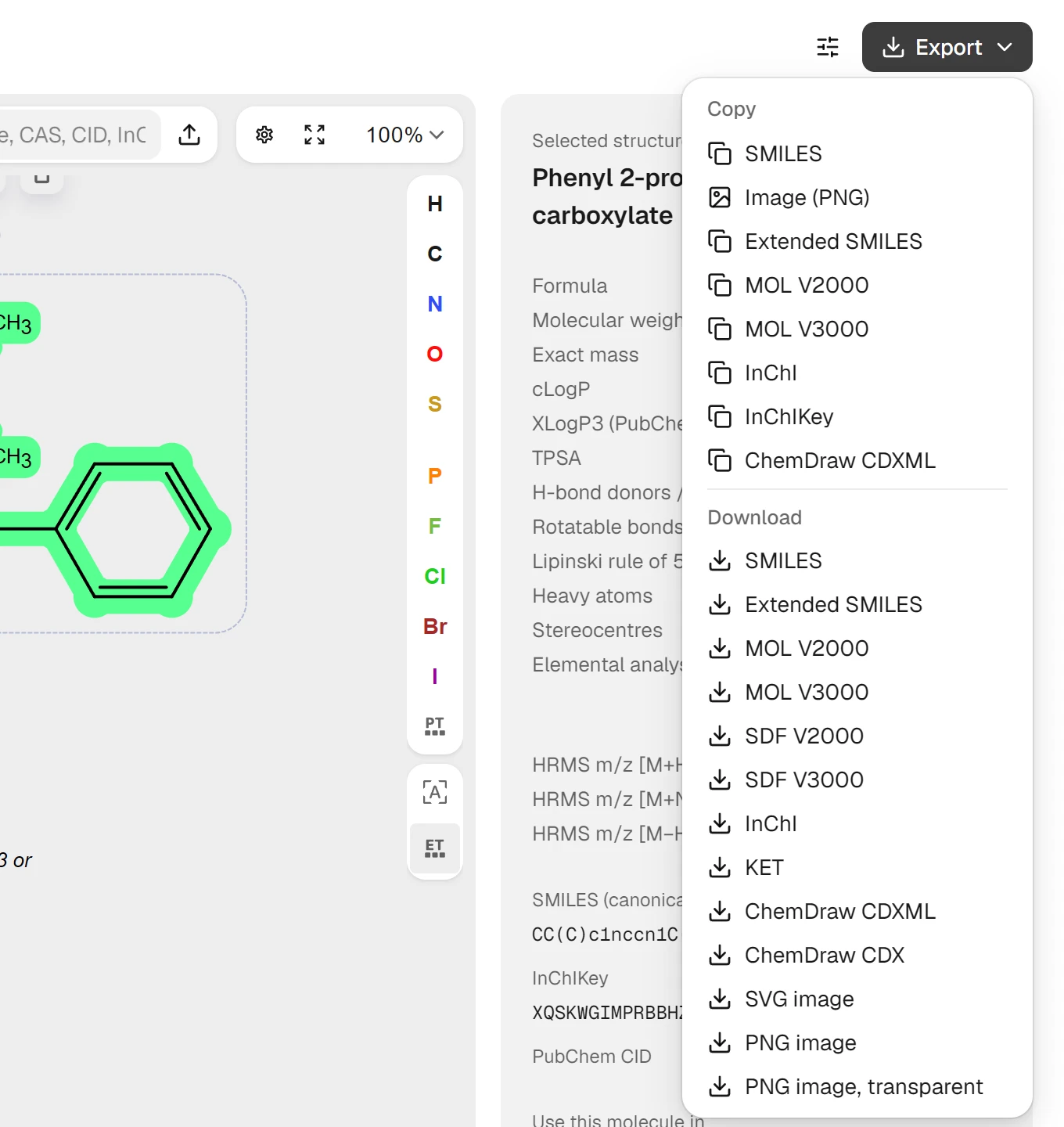
Everything in the Export menu works on whatever the file put on the canvas.
- Open the file in SketchIQ as above.
- Click
Exportat the top right of the page. - Under
Copy, pickSMILES,MOL V2000,InChIorChemDraw CDXMLto put that text on your clipboard. - Under
Download, pick a file:SDF V2000orSDF V3000for a structure library,MOL V2000for most other programs,PNG imageorSVG imagefor a slide, orChemDraw CDXandChemDraw CDXMLfor a ChemDraw user.
Pick the format by what reads it next. A docking program or a property calculator wants SMILES or SDF; a colleague with ChemDraw wants CDXML, which keeps a multi-step scheme with its arrows and conditions. CDX holds only single molecules and single reactions from SketchIQ, so the menu greys it out for a multi-step scheme and says why. The chemical file formats comparison covers what each format can hold.
To skip the file entirely, Use this molecule in under the identifiers sends the structure to AutoDock Vina for docking, Boltz-2 for co-folding with a protein, or ADMET-AI for property predictions, with no export or upload in between.
Other free ways to open ChemDraw files
Ketcher, in a browser
Ketcher, EPAM's open-source structure editor, reads and writes both CDX and CDXML, and EPAM runs a public demo of it. It is released under the Apache 2.0 license, so you can also host it yourself.[2] SketchIQ is built on Ketcher, so the two read ChemDraw files the same way; Ketcher's demo has the editor without the search, properties and tool links around it.
Open Babel, on the command line
Open Babel reads CDX but cannot write it, and its documentation warns that reactions in CDX files may not be fully interpreted.[3] Its CDXML support is described as "minimal", for chemical structures only.[4] One command turns a CDX file into SMILES:
obabel ethanol.cdx -osmiCCO
1 molecule convertedOpen Babel needs XML support compiled in to read CDXML at all. The openbabel-wheel 3.1.0 package from PyPI, which we used here, lacks it and refuses .cdxml files, as does the Open Babel build on ProteinIQ. Its CDX reading is also less forgiving of hand-typed labels: on the 2001 patent drawing, every carbon written as a text label, such as CH3 or OCH3, came out as a * placeholder atom.
RDKit, in Python
RDKit reads CDXML files directly into molecules.[5] This prints the SMILES of every structure in a file:
from rdkit import Chem

for mol in Chem.MolsFromCDXMLFile("mols.cdxml"):
    print(Chem.MolToSmiles(mol))
On the ChemDraw 10 file from our test, RDKit 2025.03 returned six SMILES with the drawn stereocentres intact, such as CC[C@H](C)c1ccsc1. Use it when you have a folder of CDXML files rather than one drawing.
ChemDraw and ChemDoodle trials
If the file has to stay a perfect ChemDraw document, with its styles, annotations and layout, open it in ChemDraw itself. Revvity Signals offers a 15-day trial, and subscriptions start at $700 per person per year for ChemDraw Prime.[6] ChemDoodle, a desktop alternative, lists CDX and CDXML among its supported formats and has a 14-day trial.[7]
The ChemDraw alternatives comparison covers both, and ChemDraw on Mac, Linux and Chromebook covers the platforms ChemDraw does not run on.
What gets lost when you convert a ChemDraw file
The structures survive. What changes is everything ChemDraw stores around them, and how much depends on where the file goes next.
Converting to SMILES, MOL or SDF keeps only the chemistry. Arrows, text, colours and layout are gone, and a molfile cannot hold a reaction at all, so SketchIQ offers RXN and RDF instead while a reaction is drawn. That loss is expected and usually what you want.
A round trip back to CDXML loses less, but more than you might think. We opened a ChemDraw 23.1 file in SketchIQ and downloaded it again as ChemDraw CDXML. All 65 atoms and 76 bonds came back, but the file shrank from 149 KB to 11 KB.
The 771 annotations that had carried the compound's notebook data, such as requested amounts, predicted properties and chemists' comments, were gone. So was the document style: bonds drawn 14.4 points long in ACS style came back 30 points long. A ChemDraw 10 file lost its object groups and the (S) and (Z) labels ChemDraw draws beside stereocentres the same way, although the stereochemistry itself survived.
Labels need a look too. ChemDraw lets you type any text onto an atom, and anything that isn't a recognised group, such as CH3, with a trailing comma in a patent drawing, becomes a placeholder atom. SketchIQ shows the label but marks the structure for a check and can't calculate its properties.
Implicit hydrogens can change as well: in one ChemDraw 23.1 reaction, sodium metal drawn as Na arrived as sodium hydride, NaH. Compare the formula in the details panel with the original drawing before you use a converted structure.
Common mistakes with CDX and CDXML files
| Problem | What you see | Fix |
|---|---|---|
| The .cdx file isn't from ChemDraw | Every chemistry tool rejects it | Open it in a text editor. A ChemDraw file starts with VjCD0100; Visual FoxPro index files also use .cdx |
| Renaming .cdx to .cdxml | The file no longer opens | Keep the original extension, then export CDXML from SketchIQ |
| A generic (Markush) structure | Molecular weight and other properties show Not available | Replace each R group or placeholder with a real substituent first |
| Text typed onto atoms | A Check the structure note and placeholder atoms | Retype the label as a group, such as OMe, or draw the atoms out |
| Changed hydrogens on metals or unusual atoms | A formula that differs from the original drawing | Compare the formula row with the drawing and correct the atom |
| A multi-step scheme saved as CDX | ChemDraw CDX is greyed out in the Export menu | Download ChemDraw CDXML, which keeps the whole scheme |
After you open the file
Most people open a ChemDraw file to do something with the molecule in it. Copy the SMILES into a spreadsheet or a paper's supporting information, check the formula against an exact mass from a mass spectrum, or send the structure straight to AutoDock Vina for docking. For several structures saved as SDF, SDF to SMILES gives one line per molecule, and the Lipinski rule of five row in SketchIQ's panel is a quick drug-likeness check.
FAQ
What program opens a CDX file?
ChemDraw is the program that writes CDX files, but SketchIQ, Ketcher, ChemDoodle and Open Babel all read them. SketchIQ and Ketcher run in a browser for free; Open Babel is a free command-line tool.
Can I open a CDXML file in a text editor?
Yes. CDXML is XML, so any text editor shows it, and the text of captions and atom labels is readable inside <s> tags. Atom positions and bonds are listed as <n> and <b> elements, which are not useful to read by hand.
How do I convert a CDX file to MOL or SDF?
Upload it to SketchIQ, click Export, and under Download pick MOL V2000 or SDF V2000. On the command line, obabel file.cdx -O file.sdf does the same with Open Babel.
Can I edit a ChemDraw file and send it back?
Yes. Open it in SketchIQ, edit the drawing, and download ChemDraw CDXML, which ChemDraw opens. Fonts, annotations and the original style settings won't carry over, so a ChemDraw user may need to reapply their document style.
How do I convert CDXML to SMILES?
Upload the file to SketchIQ and copy the SMILES from the details panel, or pick SMILES under Copy in the Export menu. A file with several molecules gives one SMILES with the molecules separated by dots; select one structure first to copy only that one. The SMILES notation guide explains how to read the result.