ChemDraw price and licenses explained
Prime, Professional, Signals ChemDraw, student and site licenses, and what is free

Matic Broz, PhD10 min
ChemDraw costs $700 a year for ChemDraw Prime, $1,355 for ChemDraw Professional and $1,415 for Signals ChemDraw. Those are Revvity Signals' list prices for one named person, paid every year, on its own online store.[1] Since January 2025 there has been no way to buy ChemDraw once and keep it.
Few people actually pay those prices. A University of Michigan undergraduate downloads the full Signals ChemDraw at no cost, because the university pays for a site license.[12] A chemist at a two-person startup pays $1,355 for Professional, and a student whose university has no license gets a 15-day trial. Which of those you are decides what ChemDraw really costs you, and whether you need a seat at all.
ChemDraw prices at a glance
| Tier | Price per year | What it adds | Runs on |
|---|---|---|---|
| ChemDraw Prime | $700 | Drawing, clean-up, SMILES and InChI paste, stereo perception, journal styles | Windows, macOS |
| ChemDraw Professional | $1,355 | Name-to-structure and structure-to-name, ¹H and ¹³C NMR prediction, HELM biopolymers, Chem3D Pro and ChemDraw for Excel on Windows | Windows, macOS |
| Signals ChemDraw | $1,415 | Everything in Professional, plus the ChemDraw+ web app, shared collections and central license management | Windows, macOS, web browser |
All three tiers include support, maintenance and new versions for as long as the subscription runs. The current desktop release, ChemDraw 26.1, came out in September 2026 for all three.[4]
What each ChemDraw tier adds
ChemDraw Prime is the drawing program and little else. It covers the hotkeys, templates, structure and reaction clean-up, SMILES and InChI copy and paste, enhanced stereo perception and the journal style sheets that make a drawing follow a journal's rules, such as the ACS document style. Revvity pitches it at students and occasional users, and on Windows it adds property predictions such as pKa, lipophilicity and solubility.[2]
For $655 more, ChemDraw Professional adds the two features people miss most when they switch: converting names to structures and structures to IUPAC names, and predicting ¹H and ¹³C NMR spectra. It also handles peptides and oligonucleotides in the HELM standard, highlights atoms and bonds in color, and links to SciFinder-n and Reaxys.[3]
On Windows, Professional also bundles ChemDraw for Excel, Chem3D Pro, ChemFinder Standard and ChemScript.[1] On a Mac you get ChemDraw itself and none of the companion programs, so a Mac user pays the same price for less.[2] The desktop app runs only on Windows and macOS, so on Linux or a Chromebook the only ChemDraw is the browser version that comes with Signals ChemDraw.
Signals ChemDraw costs only $60 more than Professional and adds the cloud side: ChemDraw+, a version of ChemDraw that runs in a web browser, plus shared collections of drawings, structure search inside stored documents, and users and licenses managed by an administrator.[4] It is the only way to get ChemDraw online, and the tier Revvity uses for its free trial.
How a ChemDraw license works
Every ChemDraw license sold today is a named-user subscription. The license belongs to one person, not to a computer, and runs for a year at a time.[2] That person can activate it on one computer and install a second copy on another, as long as both aren't in use at once.[7] A desktop at work and a laptop at home is the intended pattern.
Perpetual licenses are gone. Revvity stopped selling them for Prime and Professional on January 1, 2025, and owners could keep paying for maintenance only if their plan had never lapsed.[5] From July 1, 2026, those maintenance renewals ended too, and perpetual customers move to a subscription when their plan comes up for renewal.[6]
An old perpetual copy still runs, but it gets no updates and, once the maintenance plan ends, no support. The practical consequence is that ChemDraw is now a recurring cost: $1,355 a year for Professional adds up to $6,775 over five years.
Is there a ChemDraw academic or student price?
Not on Revvity's own store. It lists one price per tier, with no academic, student or government option, even though it describes Prime as the tier for chemistry students.[1][2]
Resellers are a different story. Alfasoft, a Swedish reseller, lists an education version of ChemDraw Prime for Windows at 2,215 Swedish kronor a year before VAT, against 6,520 kronor for the commercial version: about a third of the price. A government version sits in between at 5,150 kronor. Professional is listed only in commercial and government versions, at 12,645 and 10,035 kronor.[8]
| Tier | Education | Government | Commercial |
|---|---|---|---|
| ChemDraw Prime | 2,215 kr | 5,150 kr | 6,520 kr |
| ChemDraw Professional | - | 10,035 kr | 12,645 kr |
The commercial prices there work out at the same ratio to Revvity's dollar prices for both tiers, so the education discount is real rather than a currency effect. Ritme, a French reseller, shows prices from €210 a year before tax and gives academic and government customers their own price list after they register; it may ask for proof of status.[9]
If you are a student or academic outside a site license, ask your regional reseller for an academic quote before paying the US list price, and expect to show that you belong to an academic institution.
How ChemDraw site licenses work
Most students who use ChemDraw get it through a site license. A university pays Revvity for an academic site subscription, and everyone associated with it can install the software. At the University of Münster that means the full, current ChemDraw Professional, with no restricted features, on school computers and on personal computers of anyone with a university email address.[11]
Some universities buy the top tier instead. The University of Michigan licenses Signals ChemDraw University Edition, with ChemDraw desktop, Chem3D Ultra, ChemFinder Ultra and ChemDraw for Excel, for students, faculty and staff at no cost to them. Each person may install one copy on a university computer and one on a home computer, for instruction and non-commercial research.[12]
To get a site-license copy, register in Revvity's site subscription gallery with your institutional email, verify the address, set a password and download from the Download Center. Signals ChemDraw works differently: a local administrator has to add you to the university's Signals tenant before you can sign in.[10]
Site licenses run for a year and renew if the university keeps paying. Michigan's current term, for example, expires on November 8, 2026.[12] Because eligibility runs through your university email, expect your copy to stop working when you graduate or change jobs, and check before you start a thesis in a file format you will lose access to.
What is free with ChemDraw?
Very little. The only free version Revvity offers is a 15-day trial of Signals ChemDraw.[3] It is the full product, so it is useful for checking that ChemDraw opens a colleague's files or that NMR prediction suits your compounds, but not for a semester of homework.
The free program that used to fill the gap is gone too. ACD/ChemSketch Freeware, for years the default free alternative, was discontinued after Revvity Signals bought ACD/Labs in January 2026, and its download page now offers the ChemDraw trial instead.[13]
So the free ChemDraw most people are looking for is a site license, paid for by someone else. Without one, the choice is between paying, using the trial for a specific job, or using a different program.
Is ChemDraw worth the money?
ChemDraw earns its price if you draw structures every day and your work runs on its files. Journals, patent offices and most chemistry groups exchange CDX and CDXML files, drawings pasted into Word or PowerPoint stay editable for anyone else with ChemDraw, and the journal style sheets save real time on a paper.
The case for Professional over Prime rests on two features: name-to-structure and NMR prediction. If you name new compounds for an experimental section or check assignments against predicted shifts, they are worth the extra $655. If you only draw, Prime does the job.
For a full desktop program at a fraction of the price, ChemDoodle costs $199 a year or $999 for a lifetime license, and covers IUPAC naming and NMR simulation too.[14] It is the cheapest full desktop replacement among the ChemDraw alternatives we compared.
Where SketchIQ fits
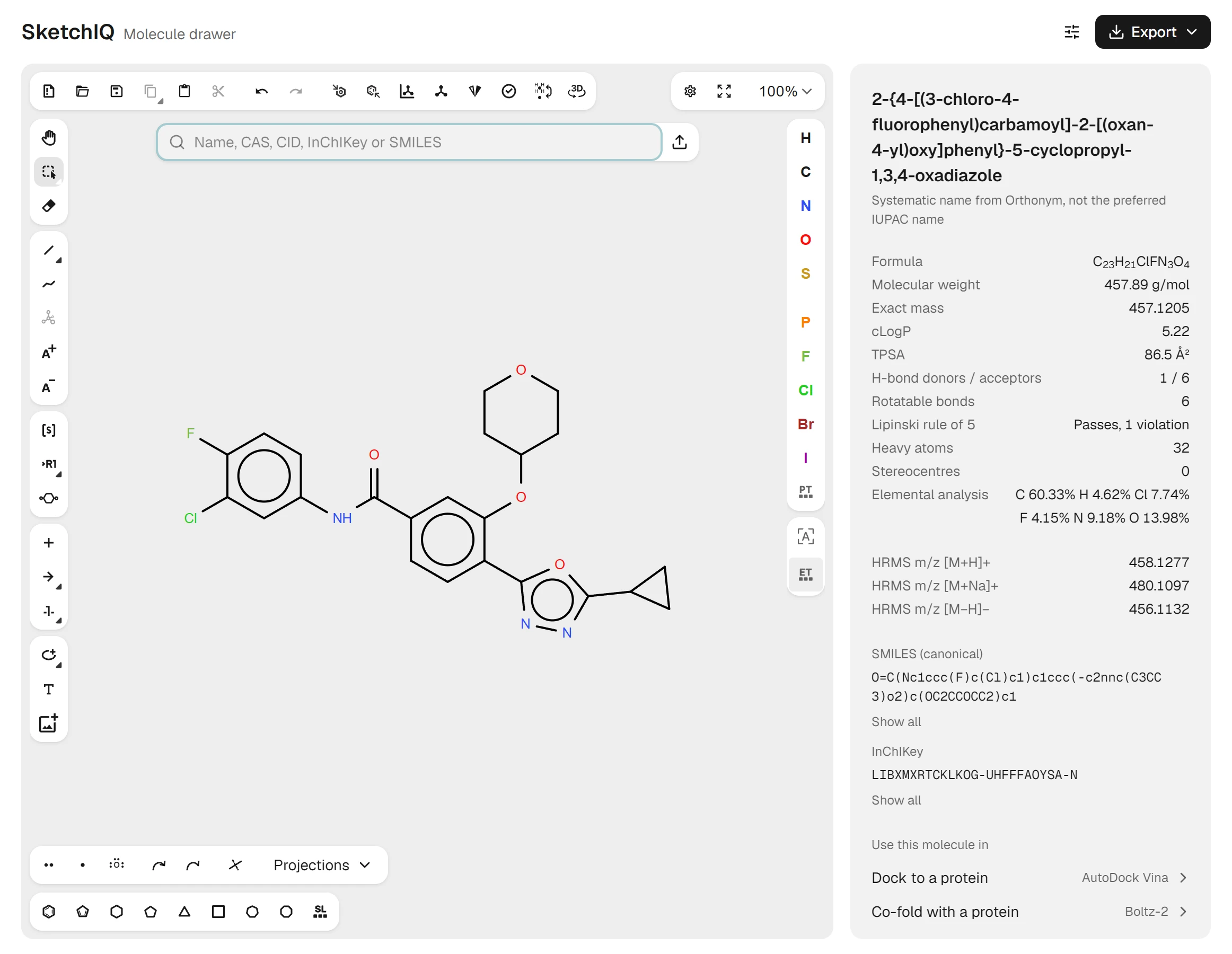
Many people who search for a ChemDraw price need a correct structure a few times a month: for a report, a slide, a docking run or a file someone sent them. For that, SketchIQ, the free chemical structure drawer by ProteinIQ, runs in the browser with no account, no install and no seat to renew.
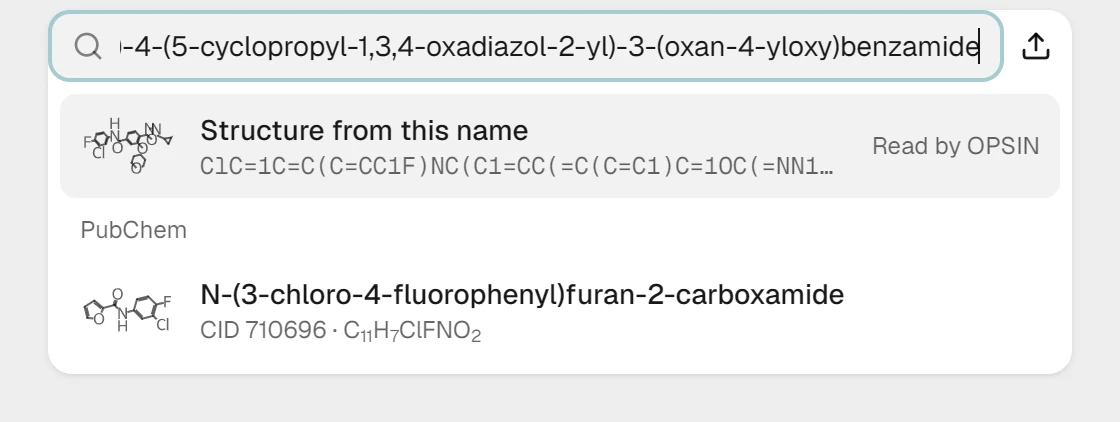
It starts where most of those jobs start, with a known compound. Type a name, CAS number, PubChem CID, InChIKey or SMILES string into the search box and PubChem matches appear as you type. Caffeine lands on the canvas with its IUPAC name, formula C₈H₁₀N₄O₂, molecular weight 194.19 g/mol, exact mass 194.0804 and an HRMS m/z of 195.0877 for [M+H]⁺.
The panel beside the drawing adds cLogP, TPSA, hydrogen-bond donors and acceptors, a Lipinski rule of 5 check and estimated pKa values, all calculated in your browser. A list underneath sends the structure straight to AutoDock Vina for docking, Boltz-2 for co-folding with a protein or ADMET-AI for absorption and toxicity predictions.
For people who work with ChemDraw users, file exchange matters most. SketchIQ opens CDX and CDXML files along with MOL, SDF, SMILES, InChI, CML, KET and RXN, and exports ChemDraw CDX and CDXML, MOL and SDF in V2000 and V3000, SMILES, InChI, InChIKey, SVG and PNG.
It also covers the naming that separates Professional from Prime, in both directions. Type a systematic name PubChem doesn't hold and OPSIN, an open-source name parser, offers the structure it reads. For a drawn structure PubChem doesn't have, Generate name returns a systematic name from Orthonym, which SketchIQ labels as not necessarily the preferred IUPAC name.
The gaps are the ones ChemDraw users notice first. SketchIQ has no journal style sheets, and copying into Word or PowerPoint pastes an image rather than an editable drawing. If those are your daily work, a ChemDraw seat or ChemDoodle is the better buy.
Which ChemDraw license should you get?
Check for a site license first. If your university or company has one, you already have ChemDraw, often Professional or Signals ChemDraw, at no cost to you.
Without one, buy Professional if you need names and NMR prediction, Prime if you only draw, and Signals ChemDraw only if you need ChemDraw in a browser or shared collections. Academics should ask a regional reseller for an education price first. If you need a structure only now and then, you can draw it online for free in SketchIQ without a subscription.