ChemSketch Freeware is gone: what to use instead
Where former ChemSketch users can draw, name and convert structures now

Matic Broz, PhD10 min
Follow an old link to ChemSketch Freeware today and you land on a page whose status reads "Discontinued". ACD/Labs explains in two sentences that Revvity Signals, the company that makes ChemDraw, acquired it in January 2026, and offers a free ChemDraw trial in place of the download.[1] The paid version went too. ACD/Labs stopped selling ChemSketch to new customers, and its product pages now redirect to ChemDraw.[2]
ChemSketch Freeware was the program schools put on lab PCs and students put on their own laptops, and ACD/Labs counted more than 2.5 million downloads of it.[3] If you are one of those users, three things matter now: whether the copy you have still counts, how to get your .sk2 drawings into a format other programs read, and which tool takes over each job ChemSketch did.
ProteinIQ makes one of the replacements below, SketchIQ, the free chemical structure drawer by ProteinIQ, so weigh what we say about it with that in mind. We name its gaps as plainly as its strengths, and we point to paid software where nothing free does the job.
What happened to ChemSketch
ACD/Labs was acquired by Revvity Signals in January 2026, and the ChemSketch Freeware page was changed to say the product is discontinued.[1] The commercial ChemSketch, sold until then for $320 a year or from $819 as a perpetual license, is no longer available to new customers either; ACD/Labs recommended ChemDraw instead and asked existing customers to contact it about their licenses.[2][3]
The site itself is being folded into Revvity Signals, and ACD/Labs says its pages will redirect over the coming months.[1] The old product page at acdlabs.com already sends you to the ChemDraw page.
Can you still use or download ChemSketch Freeware?
You may keep using a copy that is already installed. ACD/Labs says current users can continue with their existing installation under the license terms that applied to it.[1] Those terms always barred use inside a commercial organization, and the freeware came without technical support, so nothing changes there.[4] What does change is that there will be no new version and no fix if a future Windows update breaks it.
You can no longer download it from ACD/Labs. Copies on third-party download sites are not distributed by ACD/Labs, and installing one on a new machine is not the same as continuing to use an existing installation. If your university or school bought commercial ChemSketch licenses, ask whoever manages them; existing customers are dealt with directly.[2]
The practical consequence is a deadline you set yourself: the day the PC with ChemSketch on it is replaced. Before that, get your drawings out.
How to get your .sk2 files out of ChemSketch
ChemSketch saves its documents as .sk2, a format of its own that most chemistry software can't read. ChemDraw doesn't open it; Revvity's own support article says .sk2 is not supported and suggests saving the document as ChemDraw CDX or copying the structures across instead.[6] SketchIQ doesn't read .sk2 either. Of the tools in this guide, only ChemDoodle reads and writes .sk2 files.[7]
While ChemSketch still runs, convert the drawings you want to keep:
- Open the .sk2 file in ChemSketch and save a copy as ChemDraw CDX. That is the route Revvity recommends, and CDX opens in ChemDraw, ChemDoodle and SketchIQ.[6]
- For each structure you'll need again on its own, also save an MDL Molfile (.mol), the format almost every chemistry program reads. ChemSketch's format list includes MOL, RXN for reactions, CDX and CDXML, SMILES and InChI.[3]
- For figures you'll only reuse as pictures, export an image such as PNG or Windows Metafile.[3]
Then open the CDX or MOL file in SketchIQ with the upload button beside the search box, check that the structure in the details panel is what you expected, and keep a CDXML or MOL V3000 copy. CDXML is a text file and keeps reactions and multi-step schemes, which makes it the better archive format of the two. The chemical file formats guide explains what each one can and can't hold.
If ChemSketch is already gone, ChemDoodle is the remaining way to read .sk2. Its 14-day trial is meant for evaluation only: some features are restricted and everything it outputs carries a watermark.[7] Converting a folder of old drawings properly therefore means buying a license, and the cheapest is one month for $29.[8]
| Tool | ChemSketch .sk2 | ChemDraw CDX and CDXML | Runs on | Price |
|---|---|---|---|---|
| ChemSketch | Native | Opens and saves | Windows (64-bit) | No longer offered |
| SketchIQ | No | Opens and exports | Web browser | Free |
| ChemDoodle | Opens and saves | Opens and saves | Windows, macOS, Linux | $29 a month, $199 a year or $999 lifetime |
| ChemDraw | No | Native | Windows, macOS; web app with Signals ChemDraw | From $700 a year |
What ChemSketch did, and what replaces each part
Nobody used all of ChemSketch. Most people drew structures and reactions for reports, looked up a name, read off a molecular weight and pasted the drawing into Word. The freeware page promised drawings of organics, organometallics, polymers and Markush structures, figures for coursework and papers, and properties such as molecular weight, density and molar refractivity.[4] Table 2 maps those jobs to their new homes.
| In ChemSketch | Free replacement | What is missing |
|---|---|---|
| Drawing structures and reactions, with stereo bonds, charges and atom labels | SketchIQ, or another free browser editor | Lab glassware and orbital drawing templates |
| Looking up a structure in the name dictionary | SketchIQ search by name, CAS number, PubChem CID, InChIKey or SMILES | Nothing for compounds in PubChem |
| IUPAC names, in the freeware up to 50 atoms and 3 rings in any polycyclic part | SketchIQ shows PubChem's IUPAC name for known compounds and generates one for new structures | Naming preferences you can change |
| Formula, molecular weight and composition | SketchIQ: formula, molecular weight, exact mass, elemental analysis | Nothing |
| Molar refractivity, density and other calculated properties | Molar refractivity in molecular descriptors; cLogP and TPSA in SketchIQ | Density, parachor and surface tension |
| Optimized 3D model of a 2D drawing | SMILES to SDF for 3D coordinates; Avogadro to view and edit them | Nothing |
| Pasting an editable drawing into Word | SketchIQ copies a high-resolution PNG | The pasted image isn't editable |
If you relied on ChemSketch for nomenclature homework, know its limit. The freeware named only structures of up to 50 atoms of the common elements, with no more than three rings in any polycyclic part, and didn't let you change naming preferences.[5] In SketchIQ, a structure PubChem doesn't have shows Unknown name with Generate name beside it, which asks Orthonym, an open-source IUPAC namer, and shows the name only after it reads back to the same structure.
SketchIQ for former ChemSketch users
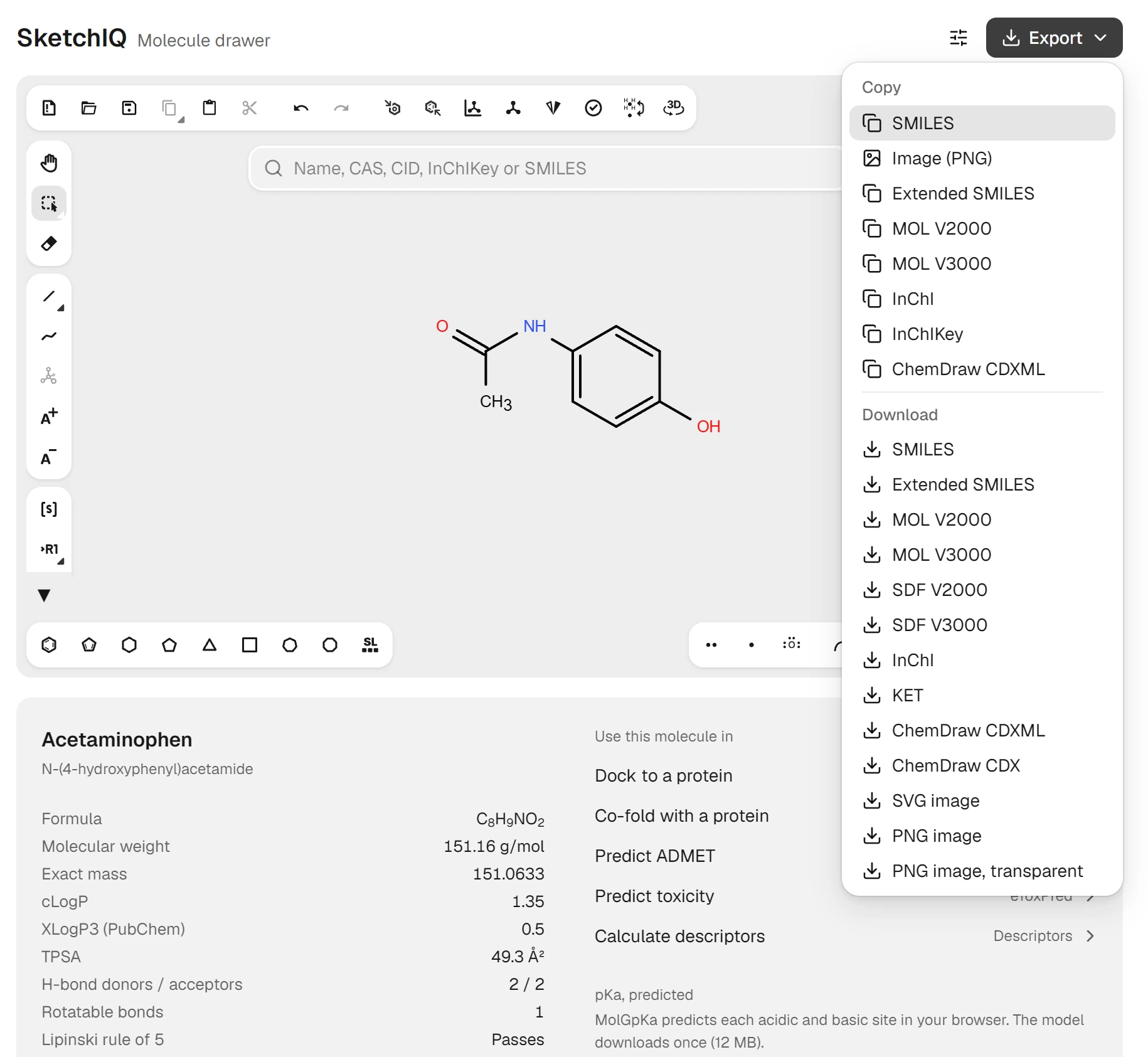
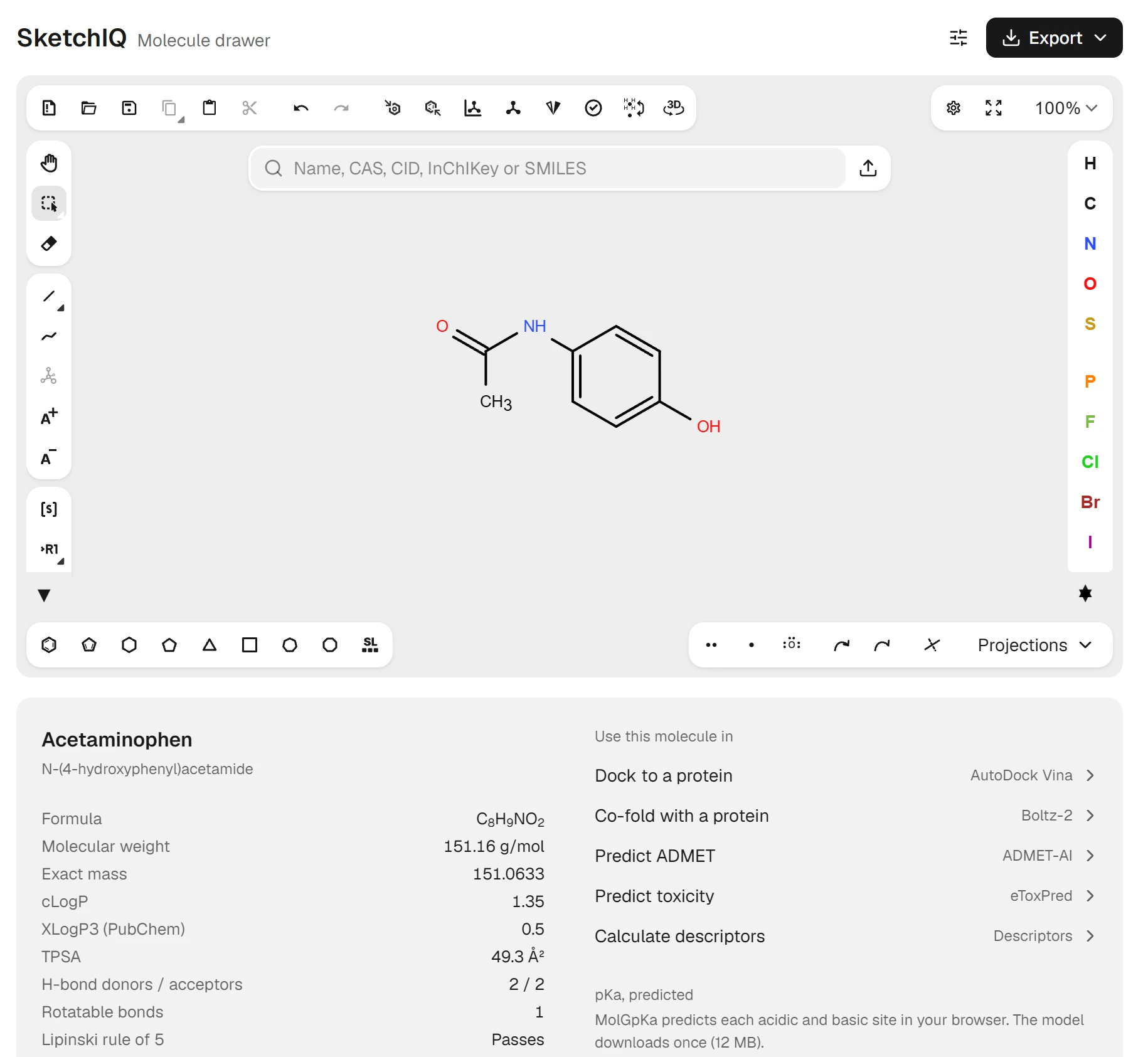
The habit to unlearn is drawing every known compound by hand. In SketchIQ, type paracetamol into the search box and press Enter. The structure comes from PubChem, and the panel below it fills with the name acetaminophen, the IUPAC name N-(4-hydroxyphenyl)acetamide, the formula , a molecular weight of 151.16 g/mol and an exact mass of 151.0633.
The same box takes a CAS number such as 103-90-2, a PubChem CID, an InChIKey or a SMILES string, which covers most of what the ChemSketch name dictionary was for.
The panel also lists properties RDKit calculates in your browser: for paracetamol a cLogP of 1.35, a TPSA of 49.3 Ų, two hydrogen-bond donors and two acceptors, and a pass on the Lipinski rule of five. Below them, a predicted pKa for each acidic and basic site gives the logD at a pH you choose, something ACD/Labs sold separately rather than putting in the freeware.[3]
Drawing works the way it did in ChemSketch: pick a bond or ring tool, click the canvas, and add charges, wedge and hash bonds, R-groups or reaction arrows from the toolbars. The editor underneath is Ketcher, EPAM's open-source structure editor. SketchIQ opens MOL, SDF, ChemDraw CDX and CDXML, SMILES, InChI, CML, KET and RXN files, and exports most of those plus SVG and PNG.
It also does something ChemSketch never did: a Use this molecule in list sends the structure to AutoDock Vina for docking, Boltz-2 for co-folding with a protein, ADMET-AI and eToxPred for absorption and toxicity predictions, or molecular descriptors. Drawing, search and export need no account; those tools run as ProteinIQ jobs, which need a free account and use credits.
The gaps are real. SketchIQ has no lab equipment or orbital templates, and doesn't calculate density or parachor. Copying into Word gives a picture, not an editable drawing. It keeps the drawing in each browser tab across reloads, but closing the tab discards it, so export anything you want to keep.
Other ChemSketch alternatives
ChemDoodle is the closest like-for-like replacement: a desktop program for Windows, macOS and Linux that reads and writes .sk2, generates IUPAC names as you draw and simulates ¹H and ¹³C NMR spectra.[7] One license covers ChemDoodle 2D, ChemDoodle 3D and the mobile apps, at $29 a month, $199 a year or $999 for a lifetime license.[8]
ChemDraw is what ACD/Labs itself points former users to. ChemDraw Prime costs $700 a year, ChemDraw Professional $1,355 with name-to-structure and structure-to-name conversion, and Signals ChemDraw $1,415 with a web app.[9] Check whether your university has a site license before paying; the ChemDraw price guide covers the tiers and student access.
Among other free tools, Ketcher, PubChem Sketcher and MolView all run in a browser, and Avogadro is a free desktop editor for 3D models rather than flat drawings. We compared them on drawing, ChemDraw file exchange and price in the free ChemDraw alternatives roundup, which applies equally to anyone leaving ChemSketch.
Is there a ChemSketch for Mac or online?
There never was a Mac version. ChemSketch was built only for 64-bit Windows, and ACD/Labs' advice to Mac users was to run it inside a Windows virtual machine.[4] With the download gone, that route is closed to anyone who doesn't already have an installer and a license.
A browser-based drawer runs the same on Windows, macOS, Linux and a Chromebook, which is why most of the free replacements are web apps. The ChemDraw on Mac, Linux and Chromebook guide covers the same question for ChemDraw, and how to draw chemical structures online walks through drawing one from scratch.
Which ChemSketch alternative should you choose?
If you still have ChemSketch installed, convert your .sk2 files to CDX and MOL now, whatever you move to. If you want a desktop program that reads your old .sk2 files directly and lets you tune its naming rules, buy ChemDoodle; if your department already runs ChemDraw, use its license.
For drawing known compounds, reading off a formula, molecular weight or SMILES, and handing a structure to a docking or ADMET tool, a browser is enough, and SketchIQ does all of it for free.