ChemDraw on Mac, Linux and Chromebook: your options
Which ChemDraw runs where, and what to use when it does not

Matic Broz, PhD10 min
If you have a recent Mac, ChemDraw will install on it. The current release, ChemDraw 26.1 from September 2026, is tested on macOS Sequoia and Tahoe,[1] and since version 25 it runs natively on Apple silicon as well as on Intel Macs.[2] What the Mac version leaves out is easier to miss: Chem3D Pro, ChemDraw for Excel, ChemFinder and the property predictions in ChemDraw Prime are Windows only.[3]
Linux and ChromeOS are a different story. Revvity Signals, which makes ChemDraw, says the desktop app runs only on Windows and macOS and cannot be installed on a Chromebook or an iPad.[4]
On those machines your choices are ChemDraw+, the browser version that comes only with the most expensive subscription, a remote Windows desktop from your university, or a free browser drawer such as SketchIQ, the free chemical structure drawer by ProteinIQ, which opens and saves ChemDraw files on any computer with a modern browser.
ProteinIQ makes SketchIQ, so weigh what we say about it with that in mind. Every platform detail about ChemDraw below comes from Revvity's own system requirements, release notes and support articles, checked on November 1, 2026.
Where each part of ChemDraw runs
ChemDraw is sold in three tiers, and all three install the same desktop app on Windows and macOS. The difference between platforms lies in what comes bundled with it. ChemDraw Professional includes ChemDraw for Excel, Chem3D Pro, ChemFinder Standard and ChemScript, but only on Windows, and the physico-chemical property predictions in every tier are a Windows feature too.[3]
| Product or feature | Windows | macOS | Linux | ChromeOS | iPad |
|---|---|---|---|---|---|
| ChemDraw desktop (Prime, Professional, Signals ChemDraw) | Windows 10 and 11, 64-bit | Sequoia and Tahoe | No | No | No, the app was discontinued |
| Physico-chemical property predictions | Yes | No | No | No | No |
| Chem3D Pro, ChemDraw for Excel, ChemFinder Standard, ChemScript | Yes, with ChemDraw Professional | No | No | No | No |
| ChemDraw+ web app (Signals ChemDraw only) | Browser | Browser | Browser | Browser | Not stated |
Revvity's requirements page puts the rule plainly: unless a platform is listed as Windows or Mac, Linux, ChromeOS and other systems are not supported.[5] There is no Linux build, and the old ChemDraw for iPad app is no longer offered.
Which macOS versions does ChemDraw support?
Revvity tests each ChemDraw release on two or three macOS versions, usually the current one and the one before it. An older macOS may still run a new ChemDraw, but nobody at Revvity has checked.
| ChemDraw version | macOS versions tested | Native on Apple silicon |
|---|---|---|
| 26.1 (September 2026) | Sequoia 15.7.9, Tahoe 26.6.2 | Yes |
| 26.0 (May 2026) | Sequoia 15.7.4, Tahoe 26.4.1 | Yes |
| 25.0 | Sonoma 14.7, Sequoia 15.5 | Yes |
| 23.0 | Ventura 13.6, Sonoma 14.2 | No, runs through Rosetta 2 |
| 22.0 | Big Sur 11.6, Monterey 12.5, Ventura 13.0 | No, runs through Rosetta 2 |
The gap to watch is macOS 27 Golden Gate. Apple released it on September 14, 2026, for Macs with an M1 chip or newer,[7] and ChemDraw 26.1 came out two weeks later still qualified only against Sequoia and Tahoe.[1] If ChemDraw is part of your daily work, hold off on Golden Gate or check with Revvity support before you upgrade.
Apple silicon and Rosetta 2
Revvity's ChemDraw 25 data sheet lists support for both ARM and Intel Mac processors as a new feature in all three tiers,[2] so ChemDraw 23 and earlier are Intel builds, which an M-series Mac runs through Rosetta 2, Apple's translation layer. That works today, but not for much longer.
Apple has said that macOS 27 is the last release with Rosetta 2 as a general tool for Intel apps; after that it keeps only a subset aimed at old games.[8] Since macOS Tahoe 26.4, launching an Intel-only app shows a warning that it will stop working when Rosetta support ends.[9] If your Mac shows that warning for ChemDraw, you are on version 23 or older and should install a current release.
Intel Macs are approaching the end from the other side. Tahoe is the last macOS that runs on them,[7] and ChemDraw 26.1 still supports Tahoe, so an Intel Mac stays on Revvity's list for now. Revvity has not said for how long.
How to download ChemDraw for Mac
Check for a site license before you buy. Many universities hold one and publish their own Mac download page with the activation code. Otherwise ChemDraw Prime and Professional come from the Revvity Signals Download Center, and Signals ChemDraw from the Signals platform.[1] Subscriptions start at $700 a person per year for ChemDraw Prime, and the free option is a 15-day trial of Signals ChemDraw.[3]
The Mac installer is a .dmg file. Open it, agree to the license, drag ChemDraw into the Applications folder and launch it. On first launch, choose Signals Account if you have a Signals ChemDraw subscription, or Activation code for a ChemDraw Professional code, and enter your details.[10]
Tahoe 26.6 brought a launch problem of its own. If ChemDraw will not open after that update, Revvity's first fix is to move com.revvity.ChemDraw.plist from ~/Library/Preferences to the Trash and launch it again.[11]
If you want the Windows-only parts on a Mac, a virtual machine is not the answer Revvity supports: it says Parallels Desktop for Mac is not supported.[12] Chem3D and ChemDraw for Excel need a Windows PC or a remote Windows desktop.
Can you run ChemDraw on Linux?
Not natively. Revvity makes no Linux version and does not support Linux.[5] People who try anyway usually reach for Wine, the compatibility layer that runs some Windows programs on Linux, with mixed results. A 2022 report in WineHQ's bug tracker describes the ChemDraw 21 installer crashing as soon as you click Install, and it was never confirmed or fixed.[13] Treat Wine as an experiment, not something to build coursework around.
The routes that work are remote ones. Universities often offer ChemDraw on a virtual Windows desktop that you open from any computer; the University of York, for one, makes its ChemDraw Professional license available that way.[14] With a Signals ChemDraw subscription you can also use ChemDraw+ in a Linux browser, described below. If you want a native desktop editor instead, ChemDoodle is a paid program that runs on Linux, Windows and Apple silicon Macs and reads CDX and CDXML files.[15]
Can you use ChemDraw on a Chromebook?
No, not as an installed app. Revvity's answer is short: ChemDraw is supported only on Windows and macOS, and it cannot be installed on ChromeOS.[4] The Linux environment that ChromeOS can switch on does not change that, since there is no Linux ChemDraw to install in it.
What does work on a Chromebook is anything that runs in Chrome. That means ChemDraw+ if your group pays for Signals ChemDraw, a university virtual desktop that opens in the browser, or a free browser drawer. For a student who needs a structure for a lab report, the last option is usually enough.
ChemDraw in the browser: ChemDraw+
ChemDraw+ is Revvity's cloud version of ChemDraw. It is exclusive to Signals ChemDraw, the $1,415-a-year tier, and lets you create, manage and curate drawings in a web browser.[1][3]
Revvity's product page still labels it a beta and describes it as core editing and drawing capabilities online.[16] It is updated throughout the year rather than with the desktop releases: recent updates added property calculations, HELM biopolymers and more file formats in May 2026, then reaction creation and coloring by element in September.[6][1]
Revvity's support pages say the Signals platform, where ChemDraw+ lives, works in most modern browsers, naming Chrome, Firefox, Safari and Chromium-based Edge.[17] They name browsers rather than operating systems, so ChemDraw+ should run on Linux and ChromeOS, but Revvity does not list them. The 15-day Signals ChemDraw trial is the cheapest way to find out on your own machine before paying.
Since ChemDraw+ comes only in the top tier, it is rarely the answer for one person on a Chromebook. It makes most sense for a group that already uses Signals Notebook and wants the same drawings available on every computer.
Free browser drawers that open ChemDraw files
A browser drawer sidesteps the platform question altogether. The same page works in Safari on a Mac, Firefox on Linux and Chrome on a Chromebook, with nothing to install and no license to activate.
SketchIQ
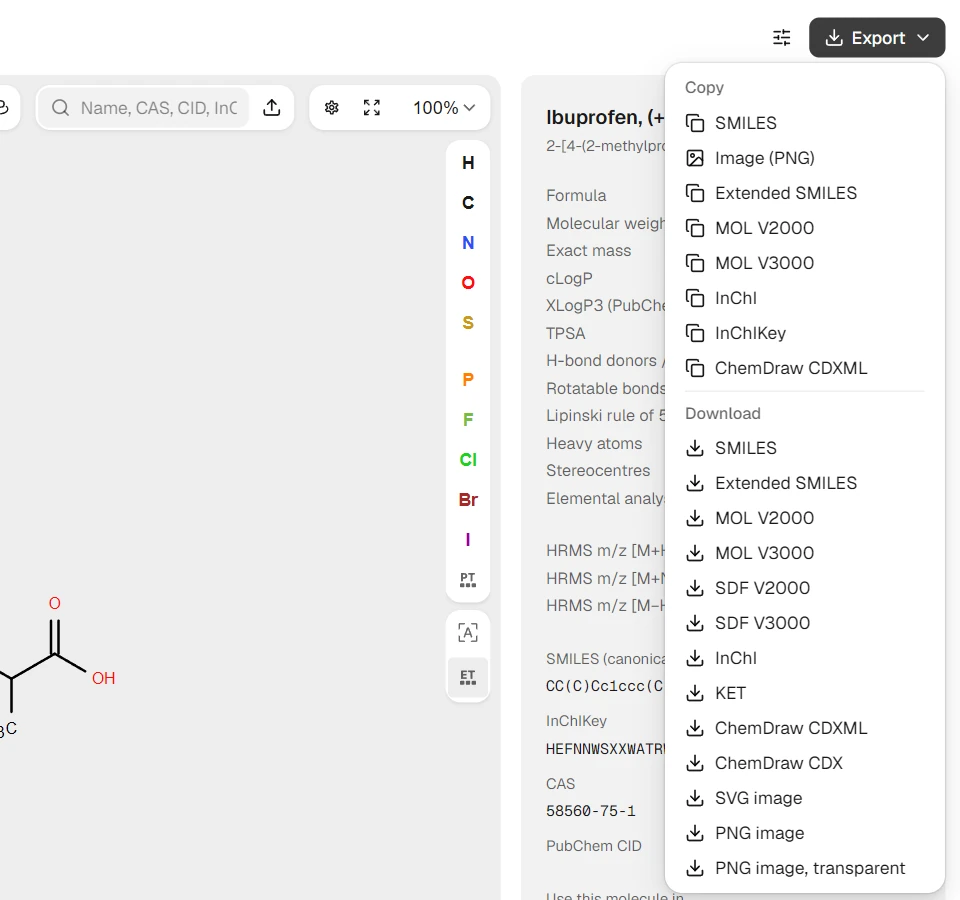
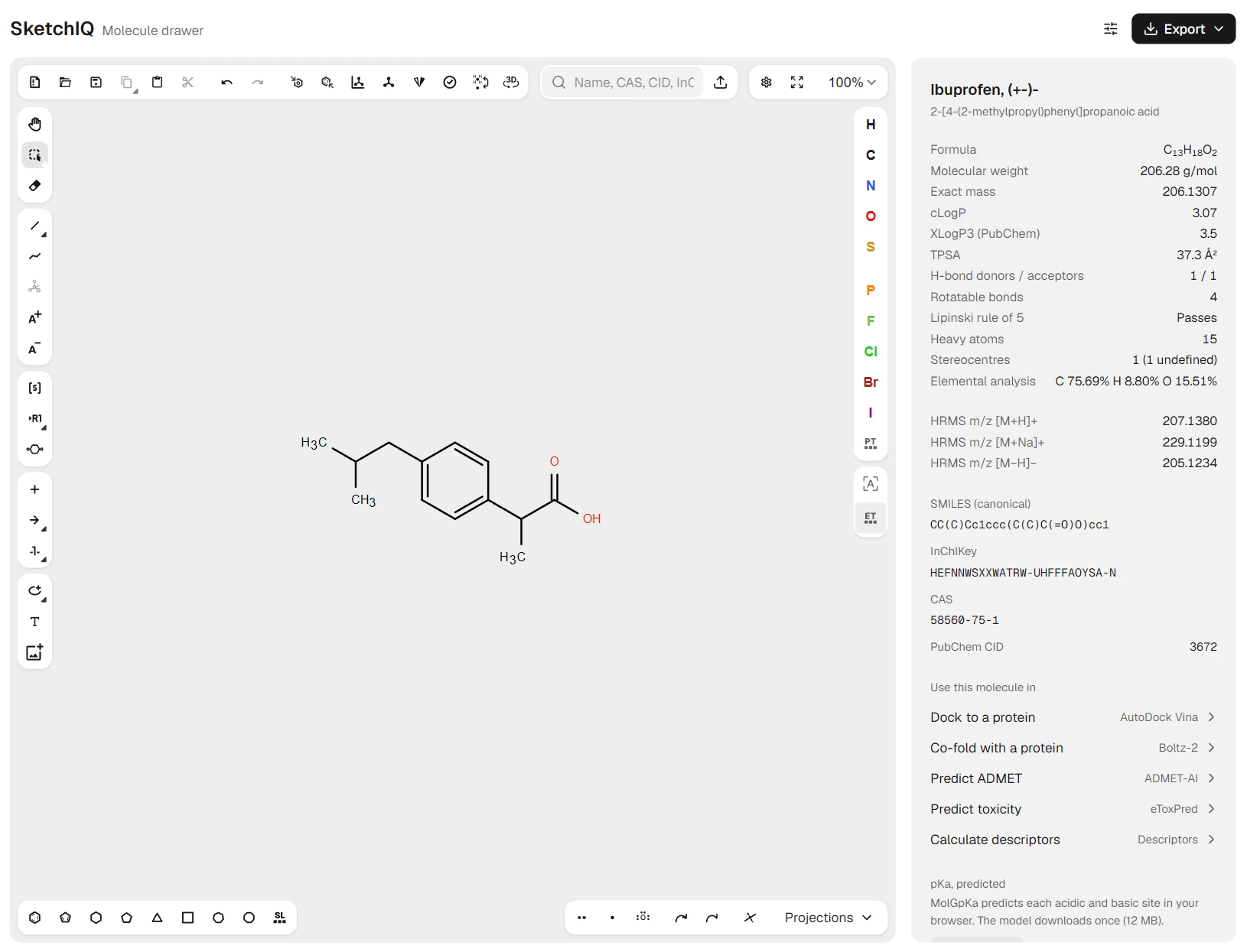
SketchIQ opens ChemDraw CDX and CDXML files from the upload button beside its search box, along with MOL, SDF, SMILES, InChI, CML, KET and RXN. It writes ChemDraw CDXML, which you can copy as text or download, and CDX as a download, as well as MOL and SDF in V2000 and V3000, SMILES, InChI, InChIKey, SVG and PNG. CDXML keeps a whole multi-step scheme; CDX holds molecules and single reactions.
You can also skip drawing. Type a name, CAS number, PubChem CID or SMILES string into the search box and the structure loads from PubChem, with its formula, molecular weight, exact mass, cLogP, TPSA and a Lipinski rule of 5 check calculated in your browser. For ibuprofen that is , 206.28 g/mol, a cLogP of 3.07 and a pass on the rule of 5. From the same panel, a drawn molecule goes straight to AutoDock Vina for docking or ADMET-AI for property predictions.
The limits are worth knowing before you rely on it. SketchIQ keeps a drawing only while its browser tab is open, so export CDXML before you close it. Copying into Word or PowerPoint gives you a PNG image, not an embedded drawing that a colleague with ChemDraw can double-click and edit. Drawing, search and export need no account.
Ketcher and PubChem Sketcher
SketchIQ is built on Ketcher, EPAM's open-source editor, which you can also use on its own in the browser. Its standalone version reads and writes CDX and CDXML without sending structures anywhere, and anyone can host it.[18] PubChem Sketcher, NCBI's free sketcher, looks dated but loads instantly, needs no account and exports ChemDraw CDX and ChemDraw XML.[19]
Neither searches by name or calculates properties the way SketchIQ does. All three, plus the desktop options, are among the free ChemDraw alternatives we compared, and the same browsers are enough to draw chemical structures online or open a CDX file without ChemDraw.
Which option fits your computer
On an Apple silicon Mac with Sequoia or Tahoe, ChemDraw 25 or newer is fully supported, so if you have a license there is nothing to work around. Update anything older than version 25 before Rosetta 2 goes, and wait for Revvity's word before moving ChemDraw to macOS 27. If you need Chem3D or ChemDraw for Excel, plan on a Windows machine or a university virtual desktop.
On Linux or a Chromebook, start with the browser. A free drawer such as SketchIQ covers drawing, ChemDraw file exchange and images for reports. Use a university virtual desktop when you need ChemDraw itself, and ChemDraw+ when your group already pays for Signals ChemDraw.