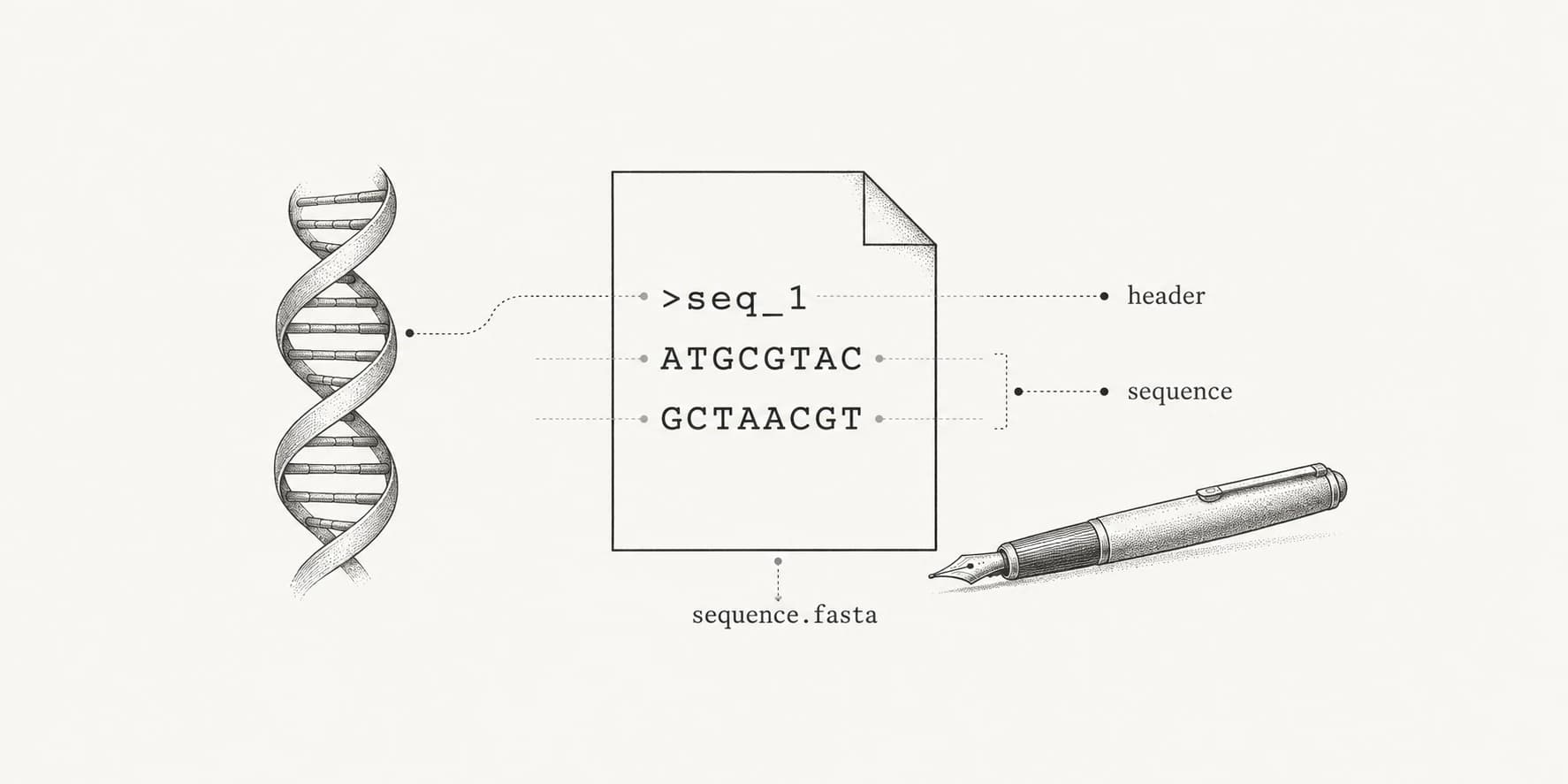
To make a FASTA file, write a header line that starts with > followed by a sequence name, put the sequence on the next line, and save the file as plain text with a .fasta or .fa extension. Repeat the header and sequence for every additional sequence in the same file. If your sequences are already in a text document, a Word file, or a spreadsheet, the TXT to FASTA converter writes the headers for you and downloads a ready .fasta file.
A minimal FASTA file with two protein sequences looks like this:
>INS_HUMAN Insulin
MALWMRLLPLLALLALWGPDPAAAFVNQHLCGSHLVEALYLVCGERGFFYTPKTRREAEDLQVGQVELGGGPGAGSLQPL
ALEGSLQKRGIVEQCCTSICSLYQLENYCN
>GLUC_HUMAN Pro-glucagon
MKSIYFVAGLFVMLVQGSWQRSLQDTEEKSRSFSASQADPLSDPDQMNEDKRHSQGTFTSDYSKYLDSRRAQDFVQWLMN
TKRNRNNIAKRHDEFERHAEGTFTSDVSSYLEGQAAKEFIAWLVKGRGRRDFPEEVAIVEELGRRHADGSFSDEMNTILD
NLAARDFINWLIQTKITDRK
The format dates to the FASTA sequence comparison programs described by Pearson and Lipman in 1988.[3] It survived because it is almost nothing: text that any program can read, which is why BLAST, aligners, and structure predictors such as AlphaFold2 all accept it.
The rules a FASTA file has to follow
A FASTA record has two parts. The header, or definition line, is a single line that begins with >. The first word after > is the sequence identifier; anything after the first space is a free-text description. NCBI asks for identifiers that are unique within the file, contain no spaces, and stay at 25 characters or fewer.[1]
The sequence follows on the next line in one-letter codes: A, C, G, T (or U for RNA) and IUPAC ambiguity codes such as N for nucleotides, or the standard amino acid letters for proteins. Lines can be any length, but NCBI recommends no more than 80 characters per line, and 60 is also common.[1] A new > line starts the next record.
| Part | Example | What to check |
|---|---|---|
| Header | >NM_000207.3 Homo sapiens insulin (INS), mRNA | Starts with >, one line, unique first word |
| Sequence | AGCCCTCCAGGACAGGCTGCATCAGAAGAG | Letters only, no numbers or spaces |
| File | insulin.fasta | Plain text, .fasta, .fa, .fna (nucleotides), or .faa (proteins) |
How to create a FASTA file in Notepad or TextEdit
Any plain-text editor works; a word processor does not, unless you force plain text.
Windows (Notepad)
- Open Notepad and type or paste the header line and the sequence.
- Click File, then Save as.
- Set Save as type to All files (*.*).
- Name the file
sequences.fastaand set Encoding to UTF-8. - Click Save.
If Save as type stays on Text documents (*.txt), Notepad saves sequences.fasta.txt. Windows hides known extensions by default, so the file still looks like sequences.fasta in File Explorer. To see the real name, turn on file name extensions (in Windows 11, View, then Show, then File name extensions).
Mac (TextEdit)
- Open TextEdit and click Format, then Make Plain Text, before pasting anything.
- Type or paste the header line and the sequence.
- Click File, then Save, and name the file
sequences.fasta. - If TextEdit asks which extension to use, click Use .fasta.
Skipping step 1 saves a rich-text .rtf file with hidden formatting codes that sequence tools can't read.
The same applies to other editors. VS Code, Notepad++, Sublime Text, and BBEdit all save plain text, so only the file name matters.
How to convert text, Word, or Excel data to FASTA
Typing headers by hand is fine for one or two sequences. For more, or for text copied from papers and lab notebooks, converting is faster and avoids stray characters.
For sequences in a text file or notes, paste them into TXT to FASTA. A line such as Human insulin above a sequence becomes its header, wrapped lines are joined, and position numbers and spacing copied from GenBank or UniProt pages are removed. Unnamed lines become >seq_1, >seq_2, and so on. For example:
BRCA1 fragment
        1 atggatttat ctgctcttcg cgttgaagaa gtacaaaatg tcattaatgc
       51 tatgcagaaa atcttagagt
converts to:
>BRCA1 fragment
ATGGATTTATCTGCTCTTCGCGTTGAAGAAGTACAAAATGTCATTAATGCTATGCAGAAAATCTTAGAGT
For a Word document, upload the .docx file to the same converter or copy its text in. Word inserts characters you can't see, such as non-breaking spaces, soft hyphens, and curly quotes, and pasting them into a FASTA file by hand is a common reason tools reject it; the converter removes them.
For a spreadsheet with a name column and a sequence column, copy the two columns from Excel or Google Sheets and paste them into TXT to FASTA, or export a CSV and use CSV to FASTA when you need to pick specific columns or add a header prefix. The reverse, turning FASTA into a spreadsheet, is FASTA to CSV.
For another sequence file format, such as GenBank, EMBL, FASTQ, or a Clustal or PHYLIP alignment, the FASTA converter detects the format and writes FASTA with the original accessions or sequence names as headers.
How to download a FASTA file from NCBI or UniProt
You don't need to build a FASTA file for a published sequence. On an NCBI Nucleotide or Protein record, choose Send to, then File, set Format to FASTA, and create the file; the header carries the versioned accession and the record title. The GenBank view of the same record contains annotation and a feature table instead, and GenBank to FASTA can extract the full sequence, individual coding sequences, or their protein translations from it. For scale, GenBank holds billions of sequence records, all available in FASTA; the GenBank statistics guide has current counts.
On a UniProt entry, the Download button offers FASTA directly. UniProt headers follow a fixed pattern, >db|accession|entry name, then the protein name and fields such as OS= (organism), OX= (taxonomy ID), GN= (gene name), PE= (protein existence), and SV= (sequence version).[2]
>sp|P01308|INS_HUMAN Insulin OS=Homo sapiens OX=9606 GN=INS PE=1 SV=1How to make a FASTA file on the command line
When the sequences are already in a text file, one command writes the FASTA. A file with one sequence per line becomes numbered records with awk:
awk '{print ">seq_" NR "\n" $0}' sequences.txt > sequences.fastaA tab-separated file with the name in the first column and the sequence in the second becomes named records:
awk -F'\t' '{print ">" $1 "\n" $2}' primers.tsv > primers.fastaFor larger jobs, SeqKit converts, rewraps, deduplicates, and summarizes FASTA files.[4] seqkit tab2fx turns the same two-column table into FASTA, and seqkit seq -w 60 rewraps an existing file to 60 characters per line. On any FASTA file, seqkit stats reports the number of sequences and their lengths, a quick check that nothing was lost.
Common mistakes that break FASTA files
Most rejected FASTA files fail for one of a handful of reasons, and most of them are invisible in the editor.
| Problem | Symptom | Fix |
|---|---|---|
Hidden .txt extension | Upload dialogs don't list the file, or the tool reports the wrong format | Show file extensions and rename to .fasta |
Rich text (.rtf, .docx) saved as FASTA | Unreadable characters or formatting codes in the output | Save as plain text, or convert the document text |
| Numbers or spaces in the sequence | Validation errors, or wrong sequence lengths | Remove position numbers and grouping spaces |
Missing > or header over two lines | The name is read as sequence | Keep each header on one line starting with > |
| Duplicate identifiers | Database builders such as makeblastdb fail, or results overwrite each other | Make the first word of every header unique |
| Spaces or special characters in the identifier | The identifier is cut at the first space | Use underscores, for example >BRCA1_exon2 |
| Windows line endings in Unix tools | A stray \r in names or errors about invalid characters | Save with LF endings, or run sed 's/\r$//' in.fasta > out.fasta |
Stop * or gap - characters | Rejected by tools that expect letters only | Remove them unless the tool accepts alignments or stops |
The converters on ProteinIQ fix the sequence-level problems automatically and tell you what they changed, such as a removed stop codon or skipped line of text, so check the notices before using the file.
After you have the FASTA file
A FASTA file is usually a starting point. Protein sequences can go straight into structure prediction with ESMFold or AlphaFold2, several related sequences into multiple sequence alignment with Clustal Omega, and DNA into GC content analysis or translation with DNA to protein. Large files can be divided with the FASTA splitter when a tool limits the number of sequences per job. The sequence alignment use case walks through a complete workflow from FASTA input to aligned output.
FAQ
What is the difference between .fasta, .fa, .fna, and .faa?
They are all the same format. .fasta and .fa are generic; .fna marks nucleotide sequences and .faa marks amino acid sequences. Tools read the content, so any of them works.
Can I save a FASTA file as .txt?
The content can be identical, but many upload forms filter by extension. Rename the file to .fasta or .fa so tools recognize it.
Does a FASTA file need line breaks every 60 or 80 characters?
No. One line per sequence is valid. Wrapping at 60 or 80 characters is a convention that keeps files readable, and NCBI recommends no more than 80.
How do I put several sequences in one FASTA file?
Write each sequence under its own > header in the same file. A file with several records is often called multi-FASTA.
Is there a FASTA file generator online?
Yes. TXT to FASTA generates a FASTA file from pasted text, a Word document, or spreadsheet rows, and the FASTA converter creates one from GenBank, FASTQ, and alignment files. Both run in the browser without an account.